This premium chapter reveals insider algorithm bypass tactics, high-tip rotation formulas, and veteran cheat sheets. Unlock the full master guide to read.
Instant Unrestricted Access to all 16 Chapters (full text in English, Spanish & Turkish; summaries in 10 more languages)
2026 Tax & Deadhead Mileage Tracker (Excel & Google Sheets)
Instant Digital Delivery • Independent shopper guide
Chapter 1: Getting Started & Gear: Sign-Up, the Checkr Screening, Waitlist Realities & 7 Essential Pieces of Gear
This chapter is for people who haven't started with Instacart yet or are getting ready for their first day. It covers the obstacles applicants commonly run into, the Checkr background check, the realities of the waitlist, and 7 essential pieces of gear that will save you hours of frustration in the field.
1. Eligibility Requirements and the Checkr Background Check
To become an Instacart Shopper, US law and the platform's rules set these basic requirements (check the current requirements on the application screen):
Be at least 18 years old (to accept orders containing alcohol, you must be 21 or older).
A valid US Driver's License.
A Social Security Number (SSN) or work authorization.
A clean driving and criminal record.
⚠️ What Reddit Says About the Checkr Review: Instacart checks your driving and criminal history through an independent platform called Checkr. • Shoppers commonly report that applications with a serious traffic violation in the last few years (DUI, extreme speeding, a suspended license, etc.) are usually rejected; the exact criteria vary by state and current policy. • If your application takes longer than 1-2 weeks, go to candidate.checkr.com and check your report's status (Pending / Clear / Consider). Delays are often caused by how long state courts take to respond to records requests.
2. The Waitlist Reality, Zone Mismatches & Field Tactics
In big metro areas (Los Angeles, New York, Miami, San Francisco, Dallas), the shopper supply is often saturated, so your application can sit on the "You are on the waitlist" screen for months, sometimes for more than a year.
A. A Busted Myth: Why the "Indeed ZIP Code Loophole" Doesn't Work
The famous tactic pushed in old YouTube and TikTok videos was: "Go to Indeed, find Instacart listings posted in the last 24 hours, enter that city's ZIP code and skip the waitlist." This means declaring an area where you don't live and won't work; it is misleading, and based on what shoppers report, it no longer works anyway.
Why Was It Said to Work in the Past? The story was that during the year-end holiday season (Thanksgiving, Christmas) and around the Super Bowl, when demand spiked, hiring quotas in some areas were loosened and people could get quick approval with distant ZIP codes.
Problems Shoppers Report Today:
Zone Mismatch: Shoppers report that when the zone on the application doesn't match where they actually work, the account gets put under review or restricted. How Instacart detects this is not public.
Checkr & Residency Check: If the application ZIP doesn't match the residence on your driver's license or in the Checkr review, you may be asked for additional proof of residence (a utility bill, a lease).
Order Drought: Even after approval, shoppers frequently say that new accounts in a saturated market see very few orders for a long time.
Gear & Setup
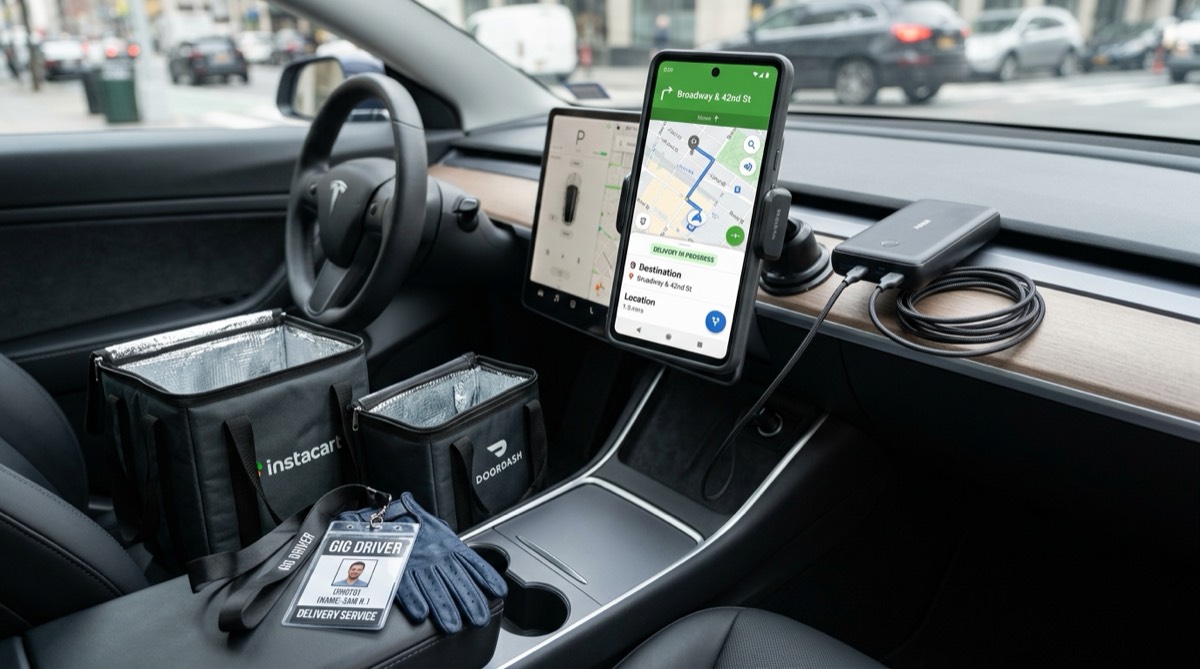
Figure 1.1: Professional Shopper Gear and Car Cockpit Setup.Turn your car into an efficient workspace with a high-capacity portable battery, insulated thermal bags and a sturdy car phone mount.
B. 4 Legitimate Waitlist Approaches Shared on Reddit (r/InstacartShoppers)
Rule-compliant methods shared by experienced shoppers in the r/InstacartShoppers community (results are not guaranteed):
The Neighboring Suburb Approach:
Research less saturated or newly developing neighboring towns/suburbs 30-45 minutes from your home where you are genuinely ready to work; if the app shows open spots in those areas, consider starting there.
Your application details (address, driver's license, residence) must always be real. Check the current rules in the app for which areas you can work in.
Resetting a Stuck Application (Data Deletion and Reapplying):
If you've been forgotten on the waitlist for more than a year, your application may be stuck in the system.
You can ask for your old application to be deleted by submitting a "Delete My Personal Information" request at privacy.instacart.com. Once the deletion is confirmed, reapply with your own current, accurate information.
Catching Seasonal Hiring Waves:
In shoppers' observation, waitlists usually start moving a few weeks before busy periods:
Early November: Thanksgiving & Black Friday prep
Early December: Christmas & New Year's shopping
Early February: Super Bowl Sunday
Early May: Mother's Day & Memorial Day
Check your email every day; when you get the "A spot has opened up" invitation, upload your onboarding documents without delay, because shoppers often report that open spots fill up quickly.
Trying to Reach a Live Agent via X (Twitter) @InstacartHelp:
In-app chatbots usually can't help with the waitlist. Shoppers report that sending a polite, clear DM to @InstacartHelp on X, such as "My Checkr step is complete. Could you check whether my application is stuck in the system?", sometimes leads to a manual review.
C. A Real Field Case: The "Eternal Waitlist", the Indeed Listing Illusion and the AI Support Loop
One of the cases most often shared in the r/InstacartShoppers community:
Scenario: An applicant applied to be a shopper in Carlsbad, CA, 3 years ago and was put on the waitlist. Years later they moved to Oceanside, saw a newly posted Instacart shopper listing on Indeed, and tried to open a brand-new account with a new email address.
What Happened? Even though the applicant used a new email, the app most likely matched the application to the old record through the phone number or SSN. The result: instead of a new application, the screen jumped back to the old waitlist screen showing the email address from 3 years earlier.
The AI Support Dead End:
The applicant calls general customer service by phone; customer support says it has no access to the shopper hiring system and redirects them to shopper support.
In shopper support, they meet not a live person but an automated AI assistant.
The assistant replies: "I can confirm your account is on the waitlist. For waitlist and hiring support, please use the Shop Talk forum."
The Catch-22: Logging into the Shop Talk forum requires an active, approved shopper account; an applicant still on the waitlist has no access to the forum.
3 Steps to Break Out of This Loop:
Data Deletion Request Through the Privacy Portal (CCPA): Instead of just trying again with a new email, go to privacy.instacart.com and create a "Delete My Personal Information" request asking for the personal data tied to your old application to be deleted. Under California's privacy law (CCPA), companies generally have 45 days to respond; some records may be retained for legal reasons.
Reapply With Accurate, Current Information: Once the deletion is confirmed, reapply with your own real phone number, current address and identity details. Don't try to hide or change identity or device information; that breaks the rules and puts your application at serious risk.
Escalate to a Live Agent on X: Rather than wasting time with the chatbot, send a direct message (DM) to @InstacartHelp on X using this template: "My application is stuck between an old waitlist profile and my current eligibility. Automated support directs me to Shop Talk, which requires an active account I cannot access. Could you please escalate my case to a team member for manual review?"
🚨 A MISTAKE YOU MUST NEVER MAKE: BUYING / RENTING AN ACCOUNT The "Approved Instacart Accounts" sold for $150-$300 on Telegram, Facebook or Craigslist violate Instacart's rules and very often end in fraud. Shoppers report that Instacart asks for selfie identity verification from time to time; accounts opened in someone else's name can be shut down at these checks, and the money and work you put in are lost.
3. 7 Essential Pieces of Gear That Save You in the Field
Many new shoppers head out with nothing but their phone and give up on day one while trying to carry 4 cases of water up to a third floor. These are the 7 essentials that veteran shoppers in the r/InstacartShoppers community say you shouldn't work without:
                       FIELD SURVIVAL GEAR
                        ┌─────────────────────────────────────────────────────────────────────────────┐
                        │ 1. Heavy-Duty Folding Wagon                    ➔ For water and heavy boxes  │
                        │ 2. Insulated Thermal Bags                      ➔ Frozen foods               │
                        │ 3. MagSafe / Sturdy Car Phone Mount            ➔ Safe navigation            │
                        │ 4. 20,000 mAh Fast-Charging Power Bank         ➔ Prevents a dead battery    │
                        │ 5. Black Permanent Sharpie Marker              ➔ Separating multi-orders    │
                        │ 6. Compact LED Flashlight                      ➔ Reading house numbers      │
                        │ 7. All-Weather Trunk Liner                     ➔ Protection from leaks      │
                        └─────────────────────────────────────────────────────────────────────────────┘
Ergonomics & Back Health: Customers, especially at Costco, order 40-packs of water (Kirkland ~45 lbs / 20.4 kg), 4-gallon packs of milk and detergents. Carrying these by hand to third-floor walk-ups or through long hallways in apartment complexes is an invitation to back and knee injuries.
Fewer Trips: Instead of going back and forth from the parking lot to the door 3-4 times, you load the whole order onto the wagon and bring it to the door in one trip. On big orders, this can save a lot of time.
Being Able to Accept Heavy Batches: It lets you take on high-tip ($40–$80) Costco and Sam's Club orders that other new shoppers reject because "this can't be carried."
Example Return on Investment (ROI): If a $70–$90 wagon, thanks to the speed and heavy-order capacity it gives you, lets you take, for example, 1 extra order a day ($20-$35), it can pay for itself within a few working days (results vary by market). As business equipment it can generally be deducted on Schedule C; consult a tax professional about your situation.
Insulated Bag Confirmation in the App: Shoppers report that the app's profile section has a step asking you to confirm your insulated bags, and that some frozen or cold-chain orders may depend on it. Check the current requirement in the Shopper app.
A Lifesaver for Multi-Store Batches: Some orders have you shop at Aldi first, then drive 15 minutes to Wegmans. The ice cream and meat you picked up at Aldi can sit in a hot trunk for 40-50 minutes. Good multi-layer thermal bags plus the ice packs you put inside help keep products cold for hours and prevent melting.
Protecting Ratings and Tips: In shoppers' experience, melted ice cream and lukewarm milk/yogurt are among the most common causes of low ratings and tip reductions. A cold delivery lowers the risk of 1-star ratings and tips being removed.
Example Return on Investment: A $25–$35 set of 2 large commercial bags pays for itself even if it stops just 1 customer a month from pulling a $15-$20 tip; it helps you keep your rating above 4.7. It can generally be deducted on Schedule C as a business expense.
Driving with your phone next to the gear shift or in your lap is an invitation to a crash and gets you a traffic ticket in many US states. Use a magnetic mount at eye level that attaches and detaches in one motion.
4. 20,000 mAh Fast-Charging Power Bank & a Durable Cable
Because the Instacart app constantly uses GPS, high screen brightness and the camera scanner, it can drain your phone battery within a few hours. Running out of battery in the middle of an active order is one of the worst nightmares.
5. Black Permanent Sharpie Marker
On orders with two or three customers (Multi-Batch), writing a big "A", "B" or "C" on the bags as they come off the register greatly reduces the risk of mixing them up.
6. Compact LED Flashlight
Street lighting in US suburbs is often weak, and house numbers on single-family homes are frequently hidden in the dark under trees or porches. Lighting up the number with a strong flashlight cuts the stress of searching for addresses and the risk of accidents.
7. All-Weather Trunk Liner or Protective Tarp
If a punctured 4-gallon milk pack, leaking raw-chicken juice or a rotten watermelon soaks into your car's upholstery, the car will smell for days and lose value. Always lay a washable rubber mat or a thick $10 tarp in the trunk.
4. 🚨 A CRITICAL LEGAL REALITY: The Personal Auto Insurance Trap & Delivery Endorsements
The Big Danger: Standard personal auto policies in the US (Geico, Progressive, State Farm, etc.) often exclude commercial use (delivery work). If you have an accident during an active delivery, your claim may be denied and your insurer may cancel your policy.
Instacart's Insurance: The coverage Instacart provides is limited; it generally applies only in certain situations, for damage to third parties, and does not cover damage to your own car. Check the current coverage in the policy in the Shopper app.
The Fix: Call your insurance company and ask whether a "Rideshare / Gig Delivery Endorsement" that covers delivery work can be added to your policy; keep in mind that some rideshare endorsements don't cover delivery. Depending on the state and the insurer, this often costs around $10 to $25 extra per month, but it can save you from a sudden $30,000 debt.
Capítulo 1: Primeros pasos y equipo: registro, verificación de Checkr, la realidad de la lista de espera y 7 elementos de equipo esenciales
Este capítulo es para quienes todavía no han empezado con Instacart o se preparan para su primer día. Explica los obstáculos más comunes del proceso de solicitud, la verificación de antecedentes de Checkr, la realidad de la lista de espera y 7 elementos de equipo esenciales que te ahorrarán horas de sufrimiento en la calle.
1. Requisitos de solicitud y verificación de antecedentes de Checkr
Para ser Shopper (comprador) de Instacart, las leyes de EE. UU. y las reglas de la plataforma establecen estos requisitos básicos (revisa los requisitos vigentes en la pantalla de solicitud):
Tener al menos 18 años (para aceptar pedidos que incluyan alcohol, debes tener 21 años o más).
Una licencia de conducir válida de EE. UU.
Un número de Seguro Social (SSN) o permiso de trabajo.
Un historial de manejo y antecedentes penales limpios.
⚠️ La experiencia de Reddit con la revisión de Checkr: Instacart consulta tu historial de manejo y tus antecedentes penales a través de una plataforma independiente llamada Checkr. • Según cuentan muchos shoppers, las solicitudes con una infracción de tránsito grave en los últimos años (DUI, exceso de velocidad extremo, licencia suspendida, etc.) suelen ser rechazadas; los criterios exactos varían según el estado y la política vigente. • Si tu solicitud tarda más de 1-2 semanas, entra en candidate.checkr.com y revisa el estado de tu informe (Pending / Clear / Consider). Los retrasos muchas veces se deben al tiempo que tardan los tribunales estatales en responder a las solicitudes de documentos.
2. La realidad de la lista de espera, los desajustes de zona y tácticas de campo
En las grandes áreas metropolitanas (Los Ángeles, Nueva York, Miami, San Francisco, Dallas), la oferta de shoppers suele estar saturada, así que tu solicitud puede quedarse meses, a veces más de un año, en la pantalla "You are on the waitlist" (Estás en la lista de espera).
A. Un mito derribado: por qué el "truco del código ZIP de Indeed" no funciona
La táctica famosa que recomendaban viejos videos de YouTube y TikTok era: "Entra en Indeed, busca anuncios de Instacart publicados en las últimas 24 horas, pon el código ZIP de esa ciudad y sáltate la lista de espera." Eso significa declarar una zona donde no vives ni vas a trabajar; es engañoso y, según lo que cuentan los shoppers, ya no da resultado.
¿Por qué se decía que funcionaba antes? Se contaba que en la temporada de fiestas de fin de año (Thanksgiving, Navidad) y en la época del Super Bowl, cuando subía la demanda, en algunas zonas se flexibilizaban los cupos de contratación y se podía obtener aprobación rápida con códigos ZIP lejanos.
Problemas que reportan los shoppers hoy:
Desajuste de zona: Los shoppers cuentan que, cuando la zona de la solicitud no coincide con el lugar donde realmente trabajan, la cuenta queda en revisión o restringida. Cómo lo detecta Instacart no es público.
Checkr y verificación de domicilio: Si el ZIP de la solicitud no coincide con el domicilio de tu licencia o de la revisión de Checkr, es posible que te pidan una prueba de domicilio adicional (una factura de servicios, un contrato de alquiler).
Escasez de pedidos: Aun con la aprobación, es frecuente oír que las cuentas nuevas en un mercado saturado reciben muy pocos pedidos durante mucho tiempo.
Equipo y configuración
Figura 1.1: Equipo profesional del shopper y configuración de la cabina del auto.Convierte tu auto en un espacio de trabajo eficiente con una batería portátil de alta capacidad, bolsas térmicas aisladas y un soporte de teléfono firme.
B. 4 enfoques legítimos para la lista de espera compartidos en Reddit (r/InstacartShoppers)
Métodos que cumplen las reglas, compartidos por shoppers con experiencia en la comunidad r/InstacartShoppers (no hay resultados garantizados):
El enfoque del suburbio vecino:
Investiga localidades o suburbios vecinos menos saturados o en crecimiento, a 30-45 minutos de tu casa, donde realmente estés dispuesto a trabajar; si la app muestra cupos abiertos en esas zonas, considera empezar allí.
Los datos de tu solicitud (dirección, licencia, domicilio) siempre deben ser reales. Revisa en las reglas vigentes de la app en qué zonas puedes trabajar.
Reiniciar una solicitud atascada (borrado de datos y nueva solicitud):
Si llevas más de un año olvidado en la lista de espera, puede que tu solicitud esté atascada en el sistema.
Puedes pedir que se elimine tu solicitud anterior enviando una solicitud "Delete My Personal Information" en privacy.instacart.com. Cuando se confirme el borrado, vuelve a solicitar con tus propios datos actuales y correctos.
Aprovechar las olas de contratación de temporada:
Según lo que observan los shoppers, las listas de espera suelen moverse unas semanas antes de las temporadas de alta demanda:
Principios de noviembre: preparación para Thanksgiving y Black Friday
Principios de diciembre: compras de Navidad y Año Nuevo
Principios de febrero: el domingo del Super Bowl
Principios de mayo: Día de la Madre y Memorial Day
Revisa tu correo todos los días; cuando recibas la invitación "A spot has opened up", sube tus documentos de incorporación (onboarding) sin demora, porque muchos shoppers cuentan que los cupos se llenan rápido.
Intentar hablar con un agente en vivo por X (Twitter) @InstacartHelp:
Los chatbots de la app normalmente no pueden ayudar con la lista de espera. Hay shoppers que cuentan que enviar un DM amable y claro a @InstacartHelp en X, del tipo "Ya completé el paso de Checkr, ¿pueden revisar si mi solicitud quedó atascada en el sistema?", a veces termina en una revisión manual.
C. Un caso real: la "lista de espera eterna", la ilusión del anuncio de Indeed y el círculo vicioso del soporte con IA
Uno de los casos que más se comparten en la comunidad r/InstacartShoppers:
Escenario: Un aspirante solicitó trabajar como shopper en Carlsbad, CA, hace 3 años y quedó en la lista de espera. Años después se mudó a Oceanside, vio en Indeed un anuncio nuevo de Instacart para shoppers e intentó abrir una cuenta desde cero con un correo nuevo.
¿Qué pasó? Aunque usó un correo nuevo, la app probablemente vinculó la solicitud con el registro anterior a través del número de teléfono o del SSN. Resultado: en lugar de una solicitud nueva, la pantalla volvió a la antigua lista de espera mostrando el correo de hace 3 años.
El callejón sin salida del soporte con IA:
El aspirante llama por teléfono al servicio al cliente general; allí le dicen que no tienen acceso al sistema de contratación de shoppers y lo envían al soporte para shoppers.
En el soporte para shoppers no lo atiende una persona, sino un asistente automático de IA.
El asistente le responde: "Confirmo que tu cuenta está en la lista de espera. Para soporte sobre la lista de espera y la contratación, usa el foro Shop Talk."
El callejón sin salida (Catch-22): Para entrar al foro Shop Talk se necesita una cuenta de shopper activa y aprobada; un aspirante que todavía está en la lista de espera no tiene acceso a ese foro.
3 pasos para salir de este círculo vicioso:
Solicitud de borrado de datos a través del portal de privacidad (CCPA): En lugar de solo volver a intentarlo con un correo nuevo, entra en privacy.instacart.com y crea una solicitud "Delete My Personal Information" para pedir que se borren los datos personales de tu solicitud anterior. Según la ley de privacidad de California (CCPA), las empresas suelen tener 45 días para responder; algunos registros pueden conservarse por motivos legales.
Vuelve a solicitar con datos correctos y actuales: Cuando se confirme el borrado, solicita de nuevo con tu propio número de teléfono real, tu dirección actual y tus datos de identidad. No intentes ocultar ni cambiar tus datos de identidad o de dispositivo; eso viola las reglas y pone tu solicitud en serio riesgo.
Escalar a un agente en vivo por X: En lugar de perder tiempo con el chatbot, envía un mensaje directo (DM) a @InstacartHelp en X con esta plantilla (se envía en inglés; pide que un miembro del equipo revise manualmente tu caso atascado): "My application is stuck between an old waitlist profile and my current eligibility. Automated support directs me to Shop Talk, which requires an active account I cannot access. Could you please escalate my case to a team member for manual review?"
🚨 UN ERROR QUE NUNCA DEBES COMETER: COMPRAR O ALQUILAR UNA CUENTA Las "cuentas de Instacart aprobadas" que se venden por $150-$300 en Telegram, Facebook o Craigslist violan las reglas de Instacart y muy a menudo terminan en estafa. Los shoppers cuentan que Instacart pide de vez en cuando una verificación de identidad con selfie; las cuentas abiertas a nombre de otra persona pueden cerrarse en esos controles, y pierdes el dinero y el trabajo invertidos.
3. 7 elementos de equipo esenciales que te salvan en la calle
Muchos shoppers nuevos salen solo con su teléfono y se rinden el primer día intentando subir 4 paquetes de agua a un tercer piso. Estos son los 7 elementos esenciales sin los que, según los shoppers veteranos de r/InstacartShoppers, no deberías trabajar:
                    EQUIPO DE SUPERVIVENCIA EN LA CALLE
                        ┌─────────────────────────────────────────────────────────────────────────────┐
                        │ 1. Carrito plegable de carga                   ➔ Agua y cajas pesadas       │
                        │ 2. Bolsas térmicas aisladas                    ➔ Alimentos congelados       │
                        │ 3. Soporte MagSafe / firme para el auto        ➔ Navegación segura          │
                        │ 4. Batería portátil de carga rápida 20,000 mAh ➔ Evita quedarte sin carga   │
                        │ 5. Marcador permanente Sharpie negro           ➔ Separar pedidos múltiples  │
                        │ 6. Linterna LED compacta                       ➔ Leer números de casa       │
                        │ 7. Protector impermeable de cajuela            ➔ Protección contra fugas    │
                        └─────────────────────────────────────────────────────────────────────────────┘
1. Carrito plegable de carga resistente — Ver en Amazon
Ergonomía y salud de la espalda: Los clientes, sobre todo en Costco, piden paquetes de 40 botellas de agua (Kirkland ~45 lbs / 20,4 kg), paquetes de leche de 4 galones y detergentes. Cargar todo eso a mano hasta un tercer piso sin elevador o por pasillos largos en complejos de apartamentos es una invitación a lesiones de espalda y rodilla.
Menos viajes: En vez de ir y venir del estacionamiento a la puerta 3-4 veces, cargas todo el pedido en el carrito y lo llevas a la puerta en un solo viaje. En pedidos grandes, esto puede ahorrarte mucho tiempo.
Poder aceptar pedidos pesados (Heavy Batches): Te permite aceptar con más tranquilidad pedidos de Costco y Sam's Club con buenas propinas ($40–$80) que otros shoppers nuevos rechazan porque "eso no se puede cargar".
Ejemplo de retorno de la inversión (ROI): Si un carrito de $70–$90, gracias a la rapidez y la capacidad de carga que te da, te permite aceptar por ejemplo 1 pedido extra al día ($20-$35), puede pagarse solo en pocos días de trabajo (los resultados varían según el mercado). Como equipo de trabajo, generalmente se puede deducir en el Schedule C; consulta a un profesional de impuestos sobre tu situación.
2. Bolsas térmicas aisladas de uso comercial — Ver en Amazon
Confirmación de bolsas térmicas en la app: Los shoppers cuentan que en la sección de perfil de la app hay un paso que te pide confirmar tus bolsas térmicas, y que algunos pedidos de congelados o que requieren cadena de frío pueden depender de ello. Revisa el requisito vigente en la app Shopper.
Salvavidas en pedidos de varias tiendas (Multi-Store Batches): En algunos pedidos primero compras en Aldi y luego manejas 15 minutos hasta Wegmans. El helado y la carne que compraste en Aldi pueden pasar 40-50 minutos en una cajuela caliente. Unas buenas bolsas térmicas de varias capas y las bolsas de hielo que pongas dentro ayudan a mantener los productos fríos durante horas y evitan que se derritan.
Protección de calificaciones y propinas: En la experiencia de muchos shoppers, el helado derretido y la leche o el yogur tibios están entre las causas más comunes de calificaciones bajas y de recortes de propina. Una entrega fría reduce el riesgo de calificaciones de 1 estrella y de que te quiten la propina.
Ejemplo de retorno de la inversión: Un juego de 2 bolsas comerciales grandes de $25–$35 se paga solo aunque evite que un solo cliente al mes retire una propina de $15-$20; además te ayuda a mantener tu calificación por encima de 4,7. Generalmente se puede deducir en el Schedule C como gasto del negocio.
3. Soporte de teléfono firme para el auto (MagSafe o clip para rejilla)
Manejar con el teléfono junto a la palanca de cambios o sobre las piernas es una invitación a un accidente y en muchos estados de EE. UU. te puede costar una multa. Usa un soporte magnético a la altura de los ojos que se coloque y se quite con un solo movimiento.
4. Batería portátil de carga rápida de 20,000 mAh y un cable resistente
Como la app de Instacart usa constantemente el GPS, un brillo de pantalla alto y el escáner de la cámara, puede agotar la batería de tu teléfono en pocas horas. Quedarte sin batería en medio de un pedido activo es una de las peores pesadillas.
5. Marcador permanente Sharpie negro
En los pedidos de dos o tres clientes (Multi-Batch), escribir una "A", "B" o "C" grande en las bolsas en cuanto salen de la caja reduce mucho el riesgo de que se mezclen.
6. Linterna LED compacta
En los suburbios de EE. UU. el alumbrado público suele ser débil, y los números de las casas muchas veces quedan a oscuras bajo los árboles o los porches. Iluminar el número con una linterna potente reduce el estrés de buscar direcciones y el riesgo de accidentes.
7. Protector impermeable de cajuela o lona protectora (All-Weather Trunk Liner)
Si un paquete de leche de 4 galones se perfora, gotea jugo de pollo crudo o una sandía podrida se filtra en la tapicería, el auto olerá durante días y perderá valor. Pon siempre en la cajuela un tapete de goma lavable o una lona gruesa de $10.
4. 🚨 UNA REALIDAD LEGAL CRUCIAL: la trampa del seguro de auto personal y la cobertura adicional para entregas
El gran peligro: En EE. UU., los seguros de auto personales estándar (Geico, Progressive, State Farm, etc.) muchas veces excluyen el uso comercial (trabajo de reparto/entregas). Si tienes un accidente durante una entrega activa, pueden rechazar tu reclamo y tu aseguradora puede cancelar tu póliza.
El seguro de Instacart: La cobertura que ofrece Instacart es limitada; en general solo aplica en ciertas situaciones, por daños a terceros, y no cubre los daños a tu propio auto. Revisa la cobertura vigente en la política de la app Shopper.
La solución: Llama a tu aseguradora y pregunta si pueden agregar a tu póliza una "Rideshare / Gig Delivery Endorsement" (cobertura adicional para entregas) que cubra el trabajo de reparto; ten en cuenta que algunas coberturas para rideshare no cubren entregas. Según el estado y la compañía, suele costar alrededor de $10 a $25 extra al mes, pero puede salvarte de una deuda repentina de $30,000.
Bölüm 1: Başlangıç ve Ekipman: Kayıt, Checkr Taraması, Bekleme Listesi Gerçekleri & 7 Temel Ekipman
Bu bölüm, Instacart'a henüz adım atmamış veya ilk gününü geçirmeye hazırlananlar için hazırlanmıştır. Başvuru sürecinde sık karşılaşılan engeller, Checkr arka plan incelemesi, bekleme listesi gerçekleri ve sahada saatlerce eziyet çekmenizi engelleyecek 7 temel ekipman detaylandırılmıştır.
1. Başvuru Şartları ve Checkr Arka Plan Taraması (Background Check)
Instacart Shopper (Alışverişçi) olabilmek için ABD yasaları ve platform kuralları gereği temel şartlar şunlardır (güncel şartları başvuru ekranında kontrol edin):
En az 18 yaşında olmak (Alkol içeren siparişleri alabilmek için ise 21 yaşından büyük olmanız gerekir).
Geçerli bir ABD Sürücü Belgesi (Driver's License).
Sosyal Güvenlik Numarası (SSN) veya çalışma izni.
Temiz bir sürüş ve adli sicil kaydı.
⚠️ Checkr İncelemesinde Reddit Deneyimi: Instacart, sürücü ve adli geçmişinizi Checkr adlı bağımsız platform üzerinden sorgular. • Kuryelerin sık aktardığına göre, son birkaç yıl içinde ağır trafik ihlali (DUI, aşırı hız, ehliyetin askıya alınması vb.) bulunan başvurular genellikle reddedilir; kesin kriterler eyalete ve güncel politikaya göre değişir. • Başvurunuz 1-2 haftadan uzun sürerse, candidate.checkr.com adresine girip raporunuzun durumunu (Pending / Clear / Consider) kontrol edin. Gecikmeler çoğu zaman eyalet mahkemelerinin evrak yanıt sürelerinden kaynaklanır.
2. Bekleme Listesi Gerçeği, Bölge Uyumsuzluğu & Saha Taktikleri
Büyük metropollerde (Los Angeles, New York, Miami, San Francisco, Dallas) kurye arzı çoğu zaman doygunluğa ulaştığı için başvurunuz aylarca, hatta 1 yıldan uzun süre "You are on the waitlist" (Bekleme listesindesiniz) ekranında takılı kalabilir.
A. Çöken Efsane: "Indeed ZIP Kodu Açığı" Neden İşe Yaramıyor?
Eski YouTube ve TikTok videolarında önerilen meşhur taktik şuydu: "Indeed'e girin, son 24 saat içinde açılan Instacart ilanlarını bulun, o şehrin ZIP kodunu girip bekleme listesini atlayın." Bu yöntem, yaşamadığınız ve çalışmayacağınız bir bölgeyi beyan etmek anlamına gelir; hem yanıltıcıdır hem de kuryelerin aktardığı deneyimlere göre artık sonuç vermemektedir.
Geçmişte Neden İşe Yaradığı Söyleniyordu? Yıl sonu tatil sezonunda (Thanksgiving, Christmas) ve Super Bowl döneminde talep arttığında bazı bölgelerde alım kotalarının esnetildiği ve uzak ZIP kodlarıyla hızlı onay alınabildiği anlatılırdı.
Kuryelerin Bugün Bildirdiği Sorunlar:
Bölge Uyumsuzluğu: Kuryeler, başvurudaki bölge ile fiilen çalıştıkları konum uyuşmadığında hesabın incelemeye alındığını veya kısıtlandığını bildiriyor. Instacart'ın bunu nasıl tespit ettiği kamuya açık değildir.
Checkr & İkametgah Kontrolü: Başvuru ZIP'i ile ehliyetinizdeki veya Checkr incelemesindeki ikametgah verisi uyuşmadığında ek ikametgah kanıtı (fatura, kira kontratı) istenebilir.
Sipariş Kıtlığı: Onay alınsa bile, doymuş bir pazarda yeni hesapların ekranına uzun süre çok az sipariş düştüğü sıkça aktarılır.
Ekipman & Kurulum
Şekil 1.1: Profesyonel Kurye Ekipmanları ve Araç Kokpit Kurulumu.Yüksek kapasiteli taşınabilir batarya, yalıtımlı termal çantalar ve sağlam araç telefonu tutucu ile aracınızı verimli bir çalışma alanına dönüştürün.
B. Reddit'te Paylaşılan 4 Meşru Bekleme Listesi Yaklaşımı (r/InstacartShoppers)
Gerçekten çalışmaya hazır olduğunuz, evinize 30-45 dakika mesafedeki daha az doygun veya yeni gelişen komşu ilçe/banliyöleri araştırın; uygulama bu bölgelerde açık kontenjan gösteriyorsa orada başlamayı değerlendirin.
Başvuru bilgileriniz (adres, ehliyet, ikametgah) her zaman gerçek olmalıdır. Hangi bölgelerde çalışabileceğinizi uygulamadaki güncel kurallardan kontrol edin.
Takılı Kalmış Başvuruyu Sıfırlama (Veri Silme ve Yeniden Başvuru):
1 yıldan uzun süredir bekleme listesinde unutulduysanız, başvurunuz sistemde takılı kalmış olabilir.
privacy.instacart.com adresinden "Delete My Personal Information" talebi göndererek eski başvurunuzun silinmesini isteyebilirsiniz. Silme işlemi onaylandıktan sonra kendi güncel ve doğru bilgilerinizle yeniden başvurun.
Mevsimsel Alım Dalgalarını Yakalama:
Kuryelerin gözlemine göre bekleme listeleri genellikle yoğun dönemlerden birkaç hafta önce hareketlenir:
Kasım başı: Thanksgiving & Black Friday hazırlığı
Aralık başı: Noel & Yılbaşı alışverişleri
Şubat başı: Super Bowl Pazar günü
Mayıs başı: Anneler Günü & Memorial Day
E-postanızı her gün kontrol edin; "A spot has opened up" davetini aldığınızda onboarding evraklarını gecikmeden yükleyin, çünkü açılan kontenjanların hızla dolduğu sıkça bildiriliyor.
X (Twitter) @InstacartHelp ile Canlı Temsilciye Ulaşmayı Denemek:
Uygulama içi chat botları bekleme listesi konusunda genellikle yardımcı olamaz. X üzerinden @InstacartHelp hesabına DM gönderip "Checkr aşamam tamamlandı, başvurumun sistemde askıda kalıp kalmadığını kontrol edebilir misiniz?" şeklinde kibar ve net bir talep iletmenin bazen manuel incelemeyle sonuçlandığı aktarılıyor.
C. Gerçek Saha Vakası: "Sonsuz Bekleme Listesi", Indeed İlanı İllüzyonu ve Yapay Zeka Destek Kısır Döngüsü
r/InstacartShoppers topluluğunda sık paylaşılan vakalardan biri:
Senaryo: Bir aday 3 yıl önce Carlsbad, CA'da kuryeliğe başvurmuş ve bekleme listesine alınmıştır. Yıllar sonra Oceanside'a taşınmış, Indeed'de yeni açılan bir Instacart kurye ilanı görmüş ve yeni bir e-posta adresiyle sıfırdan hesap açmaya çalışmıştır.
Ne Oldu? Aday yeni bir e-posta kullanmasına rağmen, uygulama başvuruyu muhtemelen telefon numarası veya SSN üzerinden eski kayıtla eşleştirmiştir. Sonuç: Yeni başvuru yerine ekran, 3 yıl önceki eski e-posta adresini gösteren eski bekleme listesi ekranına geri dönmüştür.
Yapay Zeka Destek Çıkmazı:
Aday telefonla genel müşteri hizmetlerini arar; müşteri desteği kurye işe alım sistemine erişemediğini söyleyip kurye desteğine yönlendirir.
Kurye desteğinde karşısına canlı bir insan değil, otomatik bir yapay zeka asistanı çıkar.
Asistan adaya: "Hesabınızın bekleme listesinde olduğunu teyit ediyorum. Bekleme listesi ve işe alım desteği için lütfen Shop Talk forumunu kullanın" yanıtını verir.
Çıkmaz (Catch-22): Shop Talk forumuna giriş için aktif ve onaylı bir kurye hesabı gerekir; henüz bekleme listesindeki bir adayın bu foruma erişimi yoktur.
Bu Kısır Döngüden Çıkmak İçin 3 Adım:
Gizlilik Portalı Üzerinden Veri Silme Talebi (CCPA): Sadece yeni bir e-postayla denemek yerine privacy.instacart.com adresine gidin ve "Delete My Personal Information" talebi oluşturarak eski başvurunuza ait kişisel verilerin silinmesini isteyin. Kaliforniya gizlilik yasası (CCPA) kapsamında şirketlerin yanıt süresi genellikle 45 gündür; bazı kayıtlar yasal nedenlerle saklanabilir.
Doğru ve Güncel Bilgilerle Yeniden Başvuru: Silme işlemi onaylandıktan sonra kendi gerçek telefon numaranız, güncel adresiniz ve kimlik bilgilerinizle yeniden başvurun. Kimlik veya cihaz bilgilerini gizlemeye ya da değiştirmeye çalışmayın; bu, kuralları ihlal eder ve başvurunuzu tamamen riske atar.
X Üzerinden Canlı Temsilciye Eskalasyon: Chat botuyla vakit kaybetmek yerine X platformunda @InstacartHelp hesabına doğrudan mesaj (DM) gönderip şu kalıbı kullanabilirsiniz: "My application is stuck between an old waitlist profile and my current eligibility. Automated support directs me to Shop Talk, which requires an active account I cannot access. Could you please escalate my case to a team member for manual review?"
🚨 ASLA YAPILMAMASI GEREKEN HATA: HESAP SATIN ALMA / KİRALAMA Telegram, Facebook veya Craigslist'te $150-$300'a satılan "Onaylı Instacart Hesapları" hem Instacart kurallarına aykırıdır hem de çok sık dolandırıcılıkla sonuçlanır. Kuryelerin bildirdiğine göre Instacart zaman zaman selfie ile kimlik doğrulaması ister; başkasının adına açılmış hesaplar bu kontrollerde kapatılabilir ve ödediğiniz para ile emeğiniz boşa gider.
3. Sahada Hayat Kurtaran 7 Temel Ekipman
Pek çok yeni kurye sahaya sadece telefonuyla çıkar ve ilk gününde 4 koli suyu 3. kata taşımaya çalışırken pes eder. r/InstacartShoppers topluluğundaki kıdemli kuryelerin "ekipmansız çalışmayın" dediği 7 temel ekipman:
                     SAHA HAYATTA KALMA EKİPMANLARI
                        ┌─────────────────────────────────────────────────────────────────────────────┐
                        │ 1. Katlanabilir Taşıma Arabası (Folding Wagon) ➔ Su ve ağır kutular için    │
                        │ 2. Yalıtımlı Termal Çantalar (Insulated Bags)  ➔ Dondurulmuş gıdalar        │
                        │ 3. MagSafe / Güçlü Araç Telefon Tutacağı       ➔ Güvenli navigasyon         │
                        │ 4. 20,000 mAh Hızlı Şarj Powerbank             ➔ Şarj bitmesini önler       │
                        │ 5. Siyah Kalıcı Sharpie Kalem                  ➔ Çoklu siparişleri ayırma   │
                        │ 6. Kompakt LED El Feneri                       ➔ Gece kapı numarası okuma   │
                        │ 7. Su Geçirmez Bagaj Koruması (Trunk Liner)    ➔ Sızıntılara karşı koruma   │
                        └─────────────────────────────────────────────────────────────────────────────┘
1. Katlanabilir Taşıma Arabası (Heavy-Duty Folding Wagon) — Amazon'da İncele
Ergonomi & Bel Sağlığı: Müşteriler özellikle Costco'dan 40'lı su kolileri (Kirkland ~45 lbs / 20,4 kg), 4 galonluk sütler ve deterjanlar sipariş eder. Asansörsüz 3. kat dairelerde veya uzun koridorlu sitelerde bu yükleri elle taşımak bel ve diz sakatlıklarına davetiye çıkarır.
Sefer Sayısını Azaltma: Otoparktan daire kapısına 3-4 kez gidip gelmek yerine tüm siparişi vagona yükleyip tek seferde kapıya götürürsünüz. Büyük siparişlerde bu, ciddi zaman kazandırabilir.
Ağır Siparişleri (Heavy Batches) Kabul Edebilme: Diğer yeni kuryelerin "bu taşınmaz" diyerek reddettiği yüksek bahşişli ($40–$80) Costco ve Sam's Club siparişlerini daha rahat kabul etmenizi sağlar.
Örnek Yatırım Getirisi (ROI): $70–$90'lık bir taşıma arabası, sağladığı hız ve ağır sipariş kabul kapasitesi sayesinde örneğin günde 1 ek sipariş ($20-$35) almanızı sağlarsa birkaç iş gününde kendini amorti edebilir (sonuçlar pazara göre değişir). İş ekipmanı olarak genellikle Schedule C'de gider yazılabilir; durumunuz için bir vergi uzmanına danışın.
Uygulamadaki Termal Çanta Onayı: Kuryeler, uygulamanın profil bölümünde termal çantalarınızı onaylatmanızı isteyen bir adım olduğunu ve dondurulmuş veya soğuk zincir gerektiren bazı siparişlerin bu onaya bağlı olabildiğini bildiriyor. Güncel gerekliliği Shopper uygulamasından kontrol edin.
Çoklu Mağaza (Multi-Store Batches) Kurtarıcısı: Bazı siparişlerde önce Aldi'den alışveriş yapıp ardından 15 dakika sürerek Wegmans'e gitmeniz gerekir. Aldi'den aldığınız dondurma ve etler sıcak bagajda 40-50 dakika bekleyebilir. Kaliteli çok katmanlı termal çantalar ve içlerine koyacağınız buz aküleri ürünleri saatlerce soğuk tutarak erimeyi önlemeye yardımcı olur.
Puan ve Bahşiş Koruma: Erimiş dondurma ve ılımış süt/yoğurt, kuryelerin deneyimine göre düşük puan ve bahşiş kesintisinin en yaygın sebeplerindendir. Soğuk teslimat, 1 yıldız değerlendirme ve bahşişin geri çekilmesi riskini azaltır.
Örnek Yatırım Getirisi: $25–$35'lık 2'li büyük boy ticari çanta seti, ayda yalnızca 1 müşterinin $15-$20'lık bahşişini geri çekmesini engellese bile parasını çıkarır; puanınızı 4,7 üzerinde tutmanıza yardımcı olur. Genellikle Schedule C'de iş gideri olarak yazılabilir.
3. Güçlü Araç Telefon Tutacağı (MagSafe veya Havalandırma Klipsi)
Telefonu vitesin yanında veya kucakta tutarak araç kullanmak hem kaza davetiyesidir hem de birçok ABD eyaletinde trafik cezasına yol açar. Göz hizanızda, tek hareketle takılıp çıkarılan manyetik tutacaklar kullanın.
4. 20,000 mAh Hızlı Şarj Powerbank & Dayanıklı Kablo
Instacart uygulaması sürekli GPS, yüksek ekran parlaklığı ve kamera tarayıcısı kullandığı için telefon bataryasını birkaç saat içinde tüketebilir. Aktif bir siparişin ortasında şarjınızın bitmesi en büyük kabuslardan biridir.
5. Siyah Kalıcı Sharpie Kalem
İki veya üç müşterili siparişlerde (Multi-Batch) kasadan çıkan torbaların üzerine büyük harflerle "A", "B" veya "C" yazmak poşetlerin birbirine karışma riskini büyük ölçüde azaltır.
6. Kompakt LED El Feneri
ABD banliyölerinde sokak aydınlatması çoğu zaman zayıftır ve müstakil evlerin kapı numaraları ağaçların veya sundurmaların altında karanlıkta kalır. Güçlü bir el feneriyle numarayı aydınlatmak adres arama stresini ve kaza riskini azaltır.
7. Su Geçirmez Bagaj Havuzu veya Koruma Brandası (All-Weather Trunk Liner)
Delinen 4 galonluk süt, sızan çiğ tavuk suyu veya çürük karpuz sızıntısı aracınızın döşemesine işlerse arabanız günlerce kokar ve değer kaybeder. Bagaja mutlaka yıkanabilir kauçuk paspas veya $10'lık kalın bir muşamba serin.
4. 🚨 HAYATİ HUKUKİ GERÇEK: Kişisel Araç Sigortası Tuzağı & Teslimat Ek Teminatı
Büyük Tehlike: ABD'de standart şahsi araç sigortaları (Geico, Progressive, State Farm vb.) çoğu zaman ticari kullanımı (kuryelik/teslimat) kapsam dışı tutar. Aktif teslimat sırasında yaşanan bir kazada hasar talebiniz reddedilebilir ve sigortacınız poliçenizi iptal edebilir.
Instacart'ın Sigortası: Instacart'ın sağladığı teminat sınırlıdır; genellikle yalnızca belirli durumlarda üçüncü şahıslara verilen zararlar için devreye girer ve kendi aracınızın hasarını karşılamaz. Güncel kapsamı Shopper uygulamasındaki politikadan kontrol edin.
Çözüm: Sigorta şirketinizi arayıp poliçenize teslimat işini kapsayan bir "Rideshare / Gig Delivery Endorsement" (teslimat ek teminatı) eklenip eklenemeyeceğini sorun; bazı rideshare teminatlarının teslimatı kapsamadığını unutmayın. Bu teminat eyalete ve şirkete göre çoğu zaman aylık $10 ila $25 civarında ek ücrete mal olur, ancak sizi $30,000'lık ani bir borçtan kurtarabilir.
Chapter 2: Batch Anatomy: The Numbers on Your Screen, 'No Tip, No Trip' and How Orders Are Dispatched
Many new shoppers excitedly accept the first batch that hits their screen and end up hauling 6 cases of water to a third floor, or driving 15 miles for a zero tip. This chapter explains what the numbers on the offer screen mean, a practical formula that helps you pick a profitable batch in a few seconds, and the number-one rule of the shopper community on Reddit.
1. Anatomy of the Offer Screen (What Should You Look At?)
When a batch offer arrives, 5 critical data fields appear on your screen:
┌─────────────────────────────────────────────────────────────┐
                        │  $34.50                      1.4 mi                         │
                        │  [Instacart Pay: $9.50  •  Tip: $25.00]                     │
                        ├─────────────────────────────────────────────────────────────┤
                        │  Costco Wholesale                                           │
                        │  18 items (24 units)  •  Heavy Pay Included 🏋️             │
                        ├─────────────────────────────────────────────────────────────┤
                        │  [Map Preview: Store Icon ───► Customer Home Pin]           │
                        └─────────────────────────────────────────────────────────────┘
Total Payout: The gross amount you will receive.
Payout Breakdown (Batch Pay and Customer Tip):
Batch Analytics
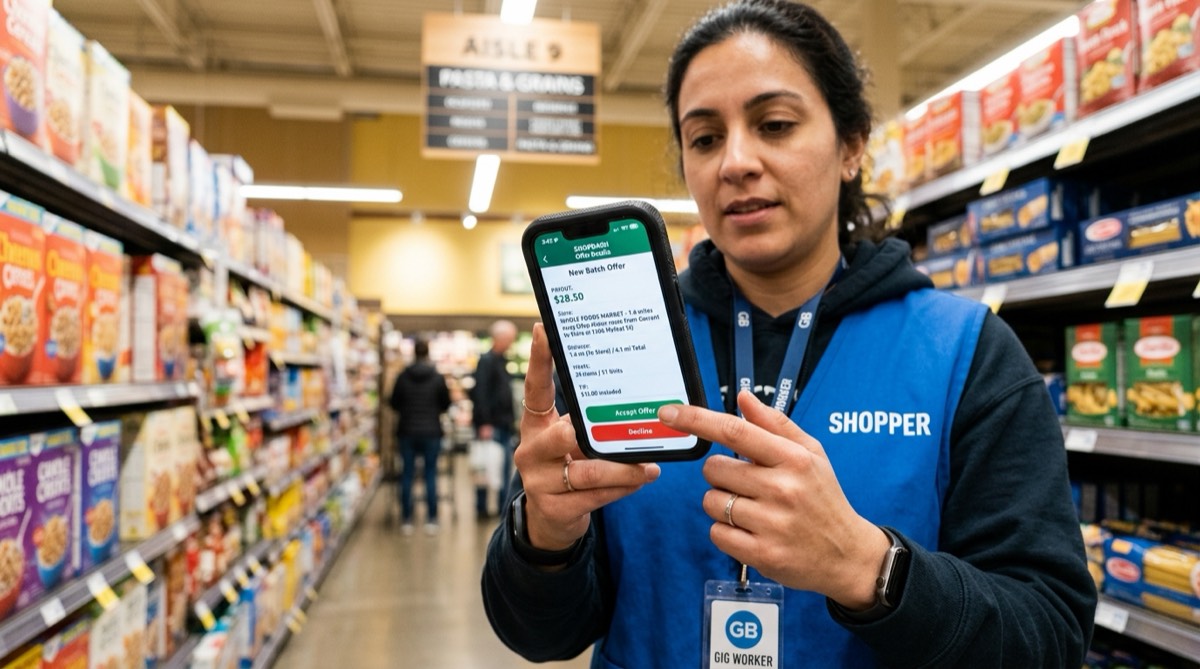
Figure 2.1: Batch Offer Screen Anatomy and Profitability Telemetry.Picking profitable batches by assessing the order total, item and unit counts, and store distance within seconds, before you accept.
Instacart (Batch) Pay: The company's base pay (shoppers commonly report it is often somewhere between a few dollars and about $10; it varies by market and by batch).
Tip: The tip the customer added. In many shoppers' experience, most of your income comes from tips!
Mileage: Usually the one-way distance from the store to the customer's home. (NOTE: Your drive to the store and your drive back after the delivery are NOT INCLUDED in this number!)
The Item and Unit TRAP:
Item: The number of different products (for example: Milk, Bread, Eggs = 3 Items).
Unit: The total number of physical pieces.
⚠️ Rookie Trap: Don't celebrate if the screen says "5 Items / 50 Units"! That usually means 5 different products but 10 cases of water each, or 50 bananas. Check whether it will fit in your car.
Heavy Pay Badge: When a batch contains heavy items above a certain weight (cases of water, cat litter, etc.), the system adds "Heavy Pay". See section 5 below for the thresholds shoppers commonly report, and check the current rule in the Shopper app.
2. Reddit's Number-One Rule: "No Tip, No Trip"
Veteran shoppers in the r/InstacartShoppers community have one non-negotiable rule: "No Tip, No Trip."
The Myth:"Maybe they'll give me a cash tip at the door, I'll take my chances."
The Reality: In many shoppers' experience, customers who place an order with a $0 tip almost never hand over a cash tip at the door.
Why Are $0-Tip Batches Dangerous?
Account Killer: In many shoppers' experience, a significant share of unfair "missing item", "never arrived" or "damaged" complaints comes from customers who don't tip.
1-Star Risk: Shoppers observe that the customers who complain the most and drag your rating down with 1 star often fit this profile.
Working at a Loss: Spending 45 minutes for $6–$7 can leave you in the red once gas and vehicle wear are deducted.
⚠️ CAUTION
🚨 Critical Regional Exception: "Will Declining Batches Get My Account Deactivated?" — Most States and New York City (NYC) Decline Pauses
One of the things shoppers most often get wrong is the difference between Acceptance Rate and Cancellation Rate:
In Most Areas (Texas, Florida, Ohio, Georgia, etc.): In shoppers' common experience, skipping offers you don't like does not by itself get your account suspended. The real risk is cancelling a batch after you have accepted it; your cancellation rate is tracked. Check the current thresholds and rules in the policy section of the Shopper app.
THE NEW YORK CITY (NYC) EXCEPTION: New York City has a city-set minimum pay rule for app-based delivery workers, and the rate is updated every year; check the current rate published by the city (DCWP).
NYC shoppers commonly report that after declining several offers in a row (or letting them expire), the app may put you on a temporary break (a "Taking a Break" type message) and you may not see offers for a while. Shoppers describe this break as sometimes short and sometimes lasting the rest of the day; Instacart does not publish the exact rule.
Field Rule: If you work within New York City limits, read the current rules in the app before declining offers as freely as you might elsewhere. (For NYC and state regulations, see Chapter 12.)
3. The 3-Second Decision Formula (The Acceptance Formula)
When a popular batch hits the screen, you often have only a few seconds before other shoppers grab it. Your brain should run it through this filter:
             3-SECOND ACCEPTANCE CHECKLIST
                        1. Dollars / Mile Ratio  ➔ At least $2.00 per mile?
                        2. Dollars / Item Ratio  ➔ (Items + Miles) <= Total Payout?
                        3. Map Zoom              ➔ Single-family home or huge apartment complex?
The Dollars-per-Mile Rule: A batch 5 miles away should pay at least $12–$15. A batch 15 miles away is not worth $20 (because you'll drive 15 miles back empty; that's 30 miles of driving in total).
The Golden Ratio (a rule of thumb shoppers use):(Item Count + Miles) <= Total Payout.
Example: 20 items + 4 miles = 24 points. If the batch pays $30, YES, grab it now! If it pays $14, NO, let it sit on the screen.
4. The "Pinch-to-Zoom" Map Reflex
Before accepting a batch, quickly pinch-zoom into the house icon on the map with two fingers:
Single-Family Home: You see one roof and a driveway. Parking is easy, there are usually no stairs, and the drop-off takes about a minute.
Apartment Complex (Multi-Family): You see dozens of buildings side by side, maze-like parking lots and a pool. That means a third floor with no elevator, gate codes and the risk of getting lost. Take it if the order is light; avoid it if there are 5 cases of water!
5. Heavy Pay: Criteria Shoppers Have Observed and System Glitches
Instacart's "Heavy Pay Included" label is extra pay for heavy batches. Instacart does not publish the full formula in detail; the thresholds below are values shoppers commonly report, so check the current rule in the Shopper app:
Single-Item Weight Requirement: Shoppers report that for an item to count, it must weigh roughly 8 lbs (3.6 kg) or more on its own (e.g. 1 gallon of milk ~8.6 lbs, a 24-pack of water ~26 lbs, a 40-pack of Costco water ~43 lbs). That means 30 cans at 2 lbs each (60 lbs total) do not count toward Heavy Pay!
Total Weight Threshold: Also according to shoppers' observations, when the total of these heavy items exceeds about 50 lbs (22.7 kg), the batch usually gets Heavy Pay ranging from a few dollars to around $15. The amount varies by batch and market.
The Reality: The system sometimes fails to recognize water or cat litter the customer added as heavy items and doesn't add Heavy Pay. In that case you can ask Support for an adjustment ("Heavy Pay Bump") after the delivery, describing the situation accurately (see Chapter 8).
6. ⚠️ The Two-Store Batch Trap and the Cold-Chain Disaster
Instacart sometimes shows 2 different store icons on the screen (e.g. 1 Batch • 2 Stores • 3 Customers: Sprouts + Target).
Why Should You Usually Avoid Them?
Double Parking and Double Checkout: You park twice, hunt for aisles twice and wait in a checkout line twice. The time loss is huge.
Breaking the Cold Chain: The ice cream, frozen meatballs and milk you bought at the first store melt in your trunk in summer heat for 40-50 minutes while you search the aisles of the second store. A customer who sees melted ice cream may give 1 star and remove the tip.
7. 💡 The Psychology of Odd-Cent and Round Tips, and the "Percentage Refund" Trap
Look carefully at the tip amount on the screen: whether it has cents or is a round number shapes your strategy while shopping:
Odd-Cent Tip (like $14.38, $8.62, $21.17):
What It Means: The customer most likely tipped as a percentage of the order total (usually 10%, 15% or 20%).
⚠️ The Big Rookie Trap (Tip Erosion): If a $45 organic ribeye or a $30 can of baby formula is out of stock and you think "I'll just refund it without asking the customer and finish faster", shoppers commonly report that because the order total drops, a percentage-based tip can drop with it (for example, at a 15% tip, a $45 refund takes about $6.75 off the tip). Rookie shoppers get home and wonder, "Why did my tip go down?"
Field Tactic: With odd-cent tips, never rush to refund. Find a sensible replacement of the same size or the closest quality and offer it to the customer. Protecting the order total protects your tip.
Round Tip (like $5.00, $10.00, $20.00):
What It Means: The customer decided on a fixed amount regardless of the order total.
Shopper Advantage: In shoppers' experience, even if 3-4 items are out of stock and you refund them, a fixed tip amount is not automatically reduced because of the refunds. (Still, remember that the customer can change the tip after delivery.)
Field Tactic: On round-tip batches, don't risk the customer's satisfaction with poor-quality items or questionable replacements; if there's no suitable replacement, don't hesitate to refund the item. You save time and keep the customer happy.
8. 🚀 The Rookie's Fast-Track Guide to Diamond Cart: Few Items, Many Batches and the 10 PM Night-Shift Tactic
If you are a new Instacart shopper, here is ONE OF THE MOST VALUABLE PIECES OF FIELD ADVICE YOU CAN GET:
In your first 2-3 weeks, don't focus on order size or huge tips; AIM TO COMPLETE MANY SMALL, LOW-ITEM BATCHES!
A. Why Many Small Batches? (Cart Star Batch Math)
Shoppers report that the upper tiers of Instacart's Cart Star program (such as Diamond Cart) give priority access to some batches. The tier criteria have changed over time; shoppers report that they are based on the number of batches completed in a three-month period plus quality metrics. Check the current criteria on the Cart Star screen in the Shopper app. In the math below we use a target of 200 completed batches in three months as an example:
The Rookie Trap: Taking 3-4 average batches of 40-50 items a day and working at an average pace. At that pace, reaching 200 batches takes 50–67 days! You'll burn out physically, and the three-month period may end and your count reset before you reach the target.
The Veteran Fast-Track Model: Completing 10 to 15 small, low-item batches a day. If you complete 12 mini batches of 1-10 items a day, you'll reach 200 batches in about 17 days (provided those batches are actually available in your area).
                  DIAMOND CART FAST-TRACK COMPARISON
                        ┌──────────────────────────────────────┬──────────────────────────────────────┐
                        │ ❌ STANDARD ROOKIE PATH              │ ⚡ VETERAN FAST-TRACK PATH            │
                        │ • 3–4 big batches/day (45+ items)    │ • 10–15 small batches/day (1–8 items)│
                        │ • Each batch: 70–90 minutes          │ • Each batch: 20–25 minutes          │
                        │ • Reaching 200 Batches: ~60 DAYS     │ • Reaching 200 Batches: ~17 DAYS     │
                        │ • Physical Burnout: Very High        │ • Physical Effort: Low               │
                        │ • Tier Progress: Very Slow / Risky   │ • Tier Progress: Much Faster         │
                        └──────────────────────────────────────┴──────────────────────────────────────┘
B. The Secret Weapon: The After-10-PM Night Shift (CVS, Walgreens and 24-Hour Stores)
One of the least stressful and fastest ways to reach 10-15 batches a day is to use the night shift:
What Happens After 10 PM? In many areas, after 10 PM, last-minute orders come in from CVS, Walgreens, 7-Eleven or late-night supermarkets.
Batch Type: 2-3 snack items (chips, ice cream, chocolate), over-the-counter medicine (aspirin, cold syrup) or urgent necessities.
4 Great Advantages of the Night Shift:
Empty Aisles: There are no crowds or strollers in the store. You can move through the aisles quickly.
Zero Checkout Lines: No waiting in line; you pay in 30 seconds at self-checkout or an empty register.
Empty Roads and Easy Parking: The roads are empty at night and there's no hunting for parking. You pull up to the door and complete the delivery.
Fast Cycle: Accepting the batch, walking into the store, grabbing 2 items, checking out and leaving them at the customer's door often takes 20–25 minutes in total!
In a 2.5-hour shift between 9:30 PM and midnight, as long as the orders come in, you can comfortably complete 5-6 batches and cover a large part of your daily target.
9. 🎯 The Strategic Shift After Earning Diamond Cart: Switching to "Selective Mode"
You've hit your target, and the notification "Congratulations! You are now a Diamond Cart Shopper" appears on your screen.
NOW IT'S TIME TO CHANGE THE RULES OF THE GAME!
The Rookie Mistake: Continuing to grab small $8-$10 batches at the same pace after becoming Diamond Cart.
The Veteran Strategy (Selective Mode):
Once you reach Diamond Cart, you have the "Priority Access" advantage. In shoppers' experience, your chances of seeing some good batches in your area ($40, $60, $100) before others go up.
Be more selective about small, mediocre batches from now on.
Park in the lots of stores with high tip potential (Costco, Wegmans, Erewhon, Sprouts, Total Wine).
Be patient; wait for the big, high-tip batches that land in the priority pool. Until you earned your status you worked for speed and volume; once you have it, you'll be selective for higher returns (some shoppers in high-demand markets report $40+ per hour; this is an illustrative example, not a typical result or a guarantee).
10. ⚠️ In-Store Add-On Batches, the "Ghost Chime" and the Big iOS Software Trap
While you are filling your cart in the store, your phone suddenly chimes and a tempting offer appears: "Add an order for +$18.50 (9 items, +1.2 mi)". These offers look like a great earning opportunity at first glance, but when accepted on an out-of-date app they can hide a software trap that quietly puts shoppers' accounts in trouble.
A. The Author's Real 2025 Field Story: How Skipping Updates for 2 Weeks Wiped Out Both Batches
📝 Author's Field Note Copy
"In 2025, while I was filling a cart in the store with my Apple iPhone, the system offered me a quite profitable extra batch (Add-On). Without hesitating, I tapped 'Accept'. But there was a serious problem in the background that I didn't know about: I had forgotten to update the app for the past 2 weeks! Because the app was out of date, the screen froze the moment I tapped accept, the system hit a sync error (bug) and the app crashed completely. When I quickly restarted the phone, I was met with a horrifying sight: not only the new add-on batch, but also the main batch I had half-filled in my cart had been taken away from me! Worse still, this technical crash was recorded as my cancellation and hit my Cancellation Rate. After the same thing happened to me once or twice more during busy periods when I fell behind on updates, I decided never to accept any Add-On batch offered while I'm in the store."
B. The "Ghost Chime" and the Black-Screen Phenomenon
It's not just crashes; another software bug that happens often in stores is this:
Sound but No Picture: The add-on offer chime blares on your phone, but no batch appears on the screen (the screen either stays blank or freezes).
Delayed Display and "Already Taken": A few seconds after the chime, the offer shows up; when you tap to accept, you get the error "This batch is no longer available".
Likely Cause: Veteran shoppers in the r/InstacartShoppers community suspect that offers are sometimes shown to several shoppers in or near the same store almost simultaneously, or that older app versions can't process batch state transitions in time. When another shopper grabs it a split second earlier, your app can get stuck.
C. Reddit Check: What Does the r/InstacartShoppers Community Say?
Many shoppers on Reddit have shared similar bad experiences:
According to shoppers, when the app version is old, batch state transitions (going from a single batch to a double batch) can cause sync problems.
Some shoppers report that after this kind of crash, both batches were taken from them and recorded as cancellations.
In shoppers' experience, standard Support chat agents may not always see the difference between a technical glitch and a cancellation by you, so explain the situation clearly with screenshots and your app version.
D. A Vital Defense: The "Wednesday Update Ritual"
The simplest way to protect yourself from these destructive bugs is this:
Don't Blindly Trust Automatic Updates: Background automatic updates on iOS and Android can sometimes be delayed for days.
A Weekly Check Day: Instacart doesn't publish an update schedule, but shoppers observe that updates often come out mid-week. Pick a fixed check day for yourself, for example Wednesday.
Pre-Shift Check: Every Wednesday morning (and in general before you go out each week), open the App Store or Google Play, search for "Instacart Shopper" and manually check whether there's an "UPDATE" button.
Memory Cleanup: Restart your phone or clear the app's cache once a week. Accepting an in-store Add-On on an out-of-date app is gambling with your cancellation rate!
11. 🧠 The Dispatch Engine: How a Batch Is Born and When It Is Offered to a Shopper
The process between a customer tapping "Place Order" in the Instacart app and your phone buzzing is not a random game of chance; a logistics optimization system runs in the background. Note: Instacart does not publish the details of its dispatch algorithm. The timings and stages below are a simplified model based on shoppers' observations, not hard rules.
A. How Many Minutes After the Order Is Placed Is It Offered to a Shopper?
After the customer places the order, payment authorization and security checks run first. Then the Delivery Type the customer chose comes into play:
Priority Delivery:
The customer paid an extra fee for faster delivery.
According to shoppers' observations, these batches usually reach the nearest shoppers' screens within a few minutes.
Standard Delivery Window:
The system appears to work on "Just-In-Time" logic; it doesn't always push the order into the pool immediately.
Backward Scheduling (simplified model):
Dispatch Time = Delivery Window Start − (Drive Time to Store + SPI × Item Count + Checkout Time + Delivery Drive Time)
The system is believed to factor in average shopping speeds (SPI) in the area and traffic data. According to shoppers' observations, a standard batch often starts being offered roughly 30-60 minutes before the start of the delivery window the customer chose.
Scheduled Delivery:
The customer placed the order at 9:00 PM but selected "Deliver tomorrow morning between 8:00 and 9:00 AM".
These orders are held overnight and, according to shoppers' observations, are usually offered to shoppers close to store opening time or the start of the delivery window.
B. Tiered Offer Waves
According to shoppers' observations, a batch doesn't always appear on everyone's screen at the same time. The commonly described flow is:
Wave 1 (Priority Group): It is believed to be shown briefly first to highly rated shoppers near the store who are in an upper Cart Star tier (e.g. Diamond Cart).
Wave 2 (Second Group): Then it opens up to other nearby shoppers.
Wave 3 (Radius Expansion): If nobody nearby takes it, it expands to the screens of shoppers farther from the store.
12. 🔄 The Life Cycle of a Declined Batch: Boosts, Bundling and Cancellation Mechanics
A batch hit the screen and no shopper around the store accepted it. According to shoppers' observations, this is roughly what happens in the background:
                     LIFE CYCLE OF A DECLINED BATCH
                        ┌─────────────────────────────────────────────────────────────────────────────┐
                        │ STEP 1: Wave Offer ➔ Nobody accepted                                        │
                        │                               ▼                                             │
                        │ STEP 2: Batch Boost (+ $1, + $2, + $4...) ➔ Increase added to base pay      │
                        │                               ▼ (If still nobody accepts)                   │
                        │ STEP 3: Bundling (Double / Triple) ➔ Paired with another order              │
                        │                               ▼ (If still not accepted)                     │
                        │ STEP 4: Delivery Window Extension ➔ Customer gets a delay notice            │
                        │                               ▼ (Store closing / timeout)                   │
                        │ STEP 5: Auto-Cancellation ➔ Order cancelled by the system, money refunded   │
                        └─────────────────────────────────────────────────────────────────────────────┘
Stage 1: Batch Boost (Automatic Increase)
As shoppers pass on the batch (by tapping "Hide" or letting it expire), the system may add an increase to the base pay to keep the delivery from running late:
Shoppers report that every few minutes a +$1.00, +$2.00, +$4.00, sometimes higher "Boost" may be added on top of Instacart Pay.
The "Includes $4.00 Boost" line you see on the screen is usually a sign that the batch has been sitting in the pool for a while and other shoppers have not taken it.
Stage 2: Bundling (Batch Bundling / The Multi-Order Trap)
If a batch has a zero tip ($0 Tip), contains 4 cases of water and is 15 miles away, it's clear nobody will take it even with a Boost.
What Shoppers Commonly Report (Paired Orders): An order like this that nobody takes sometimes gets put into the same batch with a good, light order carrying a $25 tip.
The result is a "Double Batch" (2 Shop & Deliver).
You see "$34.00" in total on the screen and accept it thinking "What a great double!" When the delivery is done, the truth comes out: Customer A tipped $25, Customer B tipped $0. Thanks to the good customer's tip, you effectively delivered the no-tip order for free. Precaution: Before accepting, tap into the batch details and check the pay and tip breakdown for each order (if the app shows it).
Stage 3: What If Nobody Accepts That Either? Does the Order Get Cancelled?
If nobody accepts the bundled batch either (or a shopper contacts Support to ask for an order to be removed from the batch), the order usually isn't cancelled right away:
Pushing Back the Delivery Time (Rescheduling): As the delivery window approaches, the customer may get a notification that the order is delayed, and delivery may be moved to a later time.
The Critical Threshold (Timeout and Auto-Cancellation):
If the order keeps getting pushed back and nobody takes it until close to the store's closing time,
Or after the order has waited a very long time (a few hours, according to shoppers' observations),
The system may automatically cancel the order because no shopper was found.
The temporary hold on the customer's card is released, the money is refunded, and the customer is sometimes given a credit as compensation.
13. 🗺️ How the Red and Orange Stores on the Map Work: The "Junk-Batch Magnet" Trap
When you open the app's main map, you see orange or bright red rings around some stores. When rookie shoppers see a red ring, they speed toward that store as if dollars were raining from the sky there.
THIS IS ONE OF THE BIGGEST ILLUSIONS OF THE GIG ECONOMY!
A. Why Does the Map Turn Red or Orange?
The demand indicator on the map (the heatmap) does NOT show that a store's batches are "good or high-tip". Instacart doesn't publish the formula; according to shoppers' observations, the colors roughly reflect a supply/demand ratio:
Map Status ≈ Batches Waiting at That Store ÷ Available Shoppers Nearby
No Ring / Normal: No batches waiting, or the number of shoppers nearby easily covers demand.
Orange Ring: The number of waiting batches slightly exceeds the number of shoppers nearby.
Red Ring: There's a serious supply/demand imbalance. Batches are waiting and there are no shoppers nearby to take them.
B. ⚠️ The Dangerous Truth: "It's Red Because of a Bad Batch"
Here is the point users and veterans wonder about most:
"Could it be red simply because there's a junk batch there that nobody wants?"
ANSWER: YES, IT COULD! In shoppers' experience, very often that's exactly why it's red!
The Mechanics: Picture a batch at a store going to a remote town 38 miles away, paying $7, with zero tip and 5 cases of water. It has been in the pool for 40 minutes. All 4 shoppers in the parking lot saw it and declined it.
The shoppers drive away from the store. What's left in the system? 1 undelivered order, 0 shoppers!
Looking at the ratio: the denominator is zero and demand is unmet! The store shows up BRIGHT RED, possibly with a line like "High demand" underneath.
Shoppers' Interpretation (The Shopper Magnet): Many shoppers believe the red color pulls shoppers from surrounding areas to that parking lot like a magnet. Sooner or later, one of the shoppers who drives there will accept that unprofitable batch.
You burn 15 minutes of gas driving to that red store; the moment you pull into the lot, what pops up on your screen is often that infamous $7 junk batch!
C. Field Rule: Be a Shopper of Time and Place, Not of the Map!
Not Every Red Store Is Good: Don't fall for misleading demand displays on the map and drive miles empty (deadhead).
Time-and-Place Discipline: Successful shoppers aren't the ones chasing colors on the map; they're the ones who know which store generates real demand at which hours and are ready there on time.
Being at Costco around its opening (check local hours; some members get early access), at stores like Sprouts just before they open in the morning, and at supermarkets near office areas before lunchtime earns, in many shoppers' experience, far more than chasing a red map.
14. 🛑 Small-Town Single-Store Saturation and the 20-Minute "Next City Over" Night Trap
When shopping in small towns or suburban areas, one of the most common traps that quietly drains shoppers' wallets is single-store saturation and the next-city-over offers that come in at night.
                     THE NIGHT "NEXT CITY OVER" TRAP
                        ┌─────────────────────────────────────────────────────────────────────────────┐
                        │ 📍 Shopper's Town: 1 Grocery Store (Kroger), 7 Shoppers in the Lot!         │
                        │ 🚗 Incoming Offer: Neighboring City 20 Minutes (15 Miles) Away              │
                        │ 📱 The Illusion on Screen: "$16.90 — 0.9 mi (Boost Included) — 8 Items"     │
                        │ ❌ The Hidden Reality:                                                      │
                        │    • 20 min (15 mi) out + 25 min shop/deliver + 20 min empty return         │
                        │    • Total Time: 65 Minutes | Total Distance: 30.9 Miles                    │
                        │    • Fuel/Wear Cost: ~$10.82 ➔ NET IN YOUR POCKET: ONLY $6.08!             │
                        │    • REAL HOURLY EARNINGS: $5.61 / HOUR (FAR BELOW MINIMUM WAGE!)           │
                        └─────────────────────────────────────────────────────────────────────────────┘
A. The Small-Town Dilemma: One Store and Too Many Shoppers
Many small towns have only one main partner grocery store (for example, just 1 Kroger or Food Lion).
At any given time you'll see 4 to 7 shoppers like you waiting for batches in the parking lot or the aisles.
Because the local order pool isn't enough for that many shoppers, the screen can stay empty for hours. In the evening, the system starts showing shoppers open orders in surrounding towns.
B. The "$16.90 - 0.9 mi" Deception: The "One and Done" Night Risk
A notification arrives: "$16.90, 0.9 mi, 8 item, Boost included".
The rookie shopper is instantly thrilled: "$18.78 per mile, what a great ratio!"
The Big Deception: That 0.9 miles is only the distance between the store in the neighboring town and the customer's home. To get to that store you have to drive 20 minutes (15 miles) on the highway!
The "One and Done" Danger: Going to the next city over during the day can be tolerable, because you can pick up more batches there back to back. But at night (after 8 PM), in that remote neighboring town, the chance of a second batch coming in is very low.
After you deliver, you have to drive another 20 minutes (15 miles) empty (deadhead) in the dark to get back to your own area!
C. Real Hourly Earnings Math (The Cold Math)
Once you accept the batch and hit the road, here is how the picture breaks down (in this example we assume your actual fuel and vehicle wear cost is $0.35 per mile; this is different from the IRS standard mileage rate used for tax deductions, which is 72.5¢ per mile for 2026 — check IRS.gov for the current rate):
Total Time Spent = 20 min driving out + 25 min shopping/delivery + 20 min empty return = 65 minutes
Total Distance Driven = 15 mi + 0.9 mi + 15 mi = 30.9 mi
Net Earnings = $16.90 − (30.9 mi × $0.35 fuel/wear) = $16.90 − $10.82 = $6.08
Bottom line: you spent more than an hour behind the wheel, put 30 miles on your car, and walked away with about 6 dollars net!
D. Veteran Shoppers' 3 Lifesaving Rules:
The Directional Anchor Rule: At night, don't accept single batches to neighboring towns unless they pay at least $35 – $40. Unless you already have a personal reason to head that way, you can't fund the empty drive back.
The Night Food-Delivery Pivot (Multi-Apping): If 5 shoppers are waiting at the only grocery store in your town, consider turning Instacart off after 7 PM and switching to DoorDash or Uber Eats, where local restaurants are open; short-distance dinner deliveries can raise your hourly earnings (some shoppers report the $25-$30 range; this is an illustrative example and varies by market). Working several apps as an independent contractor is common, but another app's order must never delay or detour an active Instacart batch — platforms may act on late deliveries and long detours.
The Home-Base Move (Morning Metro Relocation): If reaching your weekly earnings goal (for example $1,500+) regularly isn't realistic in your small town, then instead of playing musical chairs with 5 shoppers in the parking lot every day, head around 8:30 AM to a big-city hub 30-40 minutes away with a Costco + Sprouts + Wegmans cluster, and spend your whole day in that richer order pool.
Capítulo 2: Anatomía del Batch: Los números en tu pantalla, 'No Tip, No Trip' y cómo se reparten los pedidos
Muchos shoppers nuevos aceptan con emoción el primer batch que les llega y terminan cargando 6 paquetes de agua hasta un tercer piso o manejando 15 millas por cero propina. Este capítulo explica qué significan los números que aparecen en la pantalla de la oferta, una fórmula práctica que te ayuda a elegir un batch rentable en pocos segundos y la regla número uno de la comunidad de shoppers en Reddit.
1. Anatomía de la pantalla de oferta (¿Qué debes mirar?)
Cuando llega una oferta de batch, aparecen 5 campos de datos clave en tu pantalla:
┌─────────────────────────────────────────────────────────────┐
                        │  $34.50                      1.4 mi                         │
                        │  [Instacart Pay: $9.50  •  Tip: $25.00]                     │
                        ├─────────────────────────────────────────────────────────────┤
                        │  Costco Wholesale                                           │
                        │  18 items (24 units)  •  Heavy Pay Included 🏋️             │
                        ├─────────────────────────────────────────────────────────────┤
                        │  [Vista del mapa: Ícono de tienda ───► Pin de la casa]      │
                        └─────────────────────────────────────────────────────────────┘
Pago total (Total Payout): El monto bruto que vas a recibir.
Desglose del pago (Batch Pay y propina del cliente):
Análisis del batch
Figura 2.1: Anatomía de la pantalla de oferta y telemetría de rentabilidad.Elegir batches rentables evaluando en segundos el total del pedido, la cantidad de productos y unidades y la distancia a la tienda, antes de aceptar.
Instacart (Batch) Pay: El pago base de la empresa (los shoppers suelen reportar que a menudo va de unos pocos dólares a unos $10; varía según el mercado y el batch).
Tip (propina): La propina que agregó el cliente. En la experiencia de muchos shoppers, ¡la mayor parte de tus ingresos viene de las propinas!
Distancia (Mileage): Por lo general, la distancia de ida desde la tienda hasta la casa del cliente. (ATENCIÓN: ¡Tu manejo hasta la tienda y tu regreso después de la entrega NO ESTÁN INCLUIDOS en este número!)
La TRAMPA de Item (tipo de producto) y Unit (unidades totales):
Item: La cantidad de productos distintos (por ejemplo: Leche, Pan, Huevos = 3 Items).
Unit: La cantidad total de piezas físicas.
⚠️ Trampa de novato: ¡No te emociones si la pantalla dice "5 Items / 50 Units"! Eso suele significar 5 productos distintos pero 10 paquetes de agua de cada uno, o 50 plátanos. Revisa si cabe en tu carro.
Insignia de Heavy Pay: Cuando un batch incluye productos pesados por encima de cierto peso (paquetes de agua, arena para gatos, etc.), el sistema agrega "Heavy Pay". Consulta la sección 5 más abajo para ver los umbrales que suelen reportar los shoppers, y revisa la regla vigente en la app Shopper.
2. La regla número uno de Reddit: "No Tip, No Trip" (Sin propina, no hay viaje)
Los shoppers veteranos de la comunidad r/InstacartShoppers tienen una sola regla innegociable: "No Tip, No Trip."
El mito:"A lo mejor me da propina en efectivo en la puerta, voy a probar suerte."
La realidad: En la experiencia de muchos shoppers, los clientes que hacen un pedido con $0 de propina casi nunca dan propina en efectivo en la puerta.
¿Por qué son peligrosos los batches con $0 de propina?
Asesino de cuentas: En la experiencia de muchos shoppers, una parte importante de las quejas injustas de "producto faltante", "nunca llegó" o "dañado" viene de clientes que no dan propina.
Riesgo de 1 estrella: Los shoppers observan que los clientes que más se quejan y te bajan la calificación con 1 estrella con frecuencia tienen este perfil.
Trabajar a pérdida: Dedicar 45 minutos por $6–$7 puede dejarte en números rojos una vez que descuentas gasolina y desgaste del vehículo.
⚠️ PRECAUCIÓN
🚨 Excepción regional crítica: "¿Rechazar batches me desactiva la cuenta?" — La mayoría de los estados y las pausas por rechazo en New York City (NYC)
Uno de los temas en los que los shoppers más se equivocan es la diferencia entre la Acceptance Rate (tasa de aceptación) y la Cancellation Rate (tasa de cancelación):
En la mayoría de las zonas (Texas, Florida, Ohio, Georgia, etc.): Según la experiencia común de los shoppers, dejar pasar ofertas que no te gustan no provoca por sí solo la suspensión de tu cuenta. El riesgo real es cancelar un batch después de aceptarlo; tu tasa de cancelación se monitorea. Revisa los umbrales y reglas vigentes en la sección de políticas de la app Shopper.
LA EXCEPCIÓN DE NEW YORK CITY (NYC): New York City tiene una regla de pago mínimo fijada por la ciudad para los repartidores de apps, y la tarifa se actualiza cada año; consulta la tarifa vigente publicada por la ciudad (DCWP).
Los shoppers de NYC suelen reportar que, después de rechazar varias ofertas seguidas (o dejar que expiren), la app puede ponerte en una pausa temporal (un aviso tipo "Taking a Break") y es posible que no veas ofertas por un rato. Los shoppers cuentan que esta pausa a veces es corta y a veces dura el resto del día; Instacart no publica la regla exacta.
Regla de campo: Si trabajas dentro de los límites de New York City, lee las reglas vigentes en la app antes de rechazar ofertas con la libertad con la que lo harías en otras zonas. (Para las regulaciones de NYC y de los estados, consulta el Capítulo 12.)
3. La fórmula para decidir en 3 segundos (fórmula de aceptación)
Cuando aparece un batch atractivo, a menudo solo tienes unos pocos segundos antes de que otros shoppers lo tomen. Tu cabeza debe pasarlo por este filtro:
             LISTA DE ACEPTACIÓN DE 3 SEGUNDOS
                        1. Relación dólares / milla  ➔ ¿Al menos $2.00 por milla?
                        2. Relación dólares / item   ➔ ¿(Items + Millas) <= Pago total?
                        3. Zoom en el mapa           ➔ ¿Casa independiente o complejo enorme?
Regla de dólares por milla: Un batch a 5 millas debería pagar al menos $12–$15. Un batch a 15 millas no vale $20 (porque vas a regresar 15 millas vacío; son 30 millas de manejo en total).
La proporción de oro (una regla práctica que usan los shoppers):(Cantidad de productos + Millas) <= Pago total.
Ejemplo: 20 productos + 4 millas = 24 puntos. Si el batch paga $30, SÍ, ¡tómalo ya! Si paga $14, NO, déjalo en la pantalla.
4. El reflejo de "Pinch-to-Zoom" (acercar el mapa)
Antes de aceptar un batch, haz zoom rápido con dos dedos sobre el ícono de la casa en el mapa:
Casa independiente (Single Family Home): Ves un solo techo y una entrada para autos. Es fácil estacionarse, por lo general no hay escaleras y la entrega toma más o menos un minuto.
Complejo de apartamentos (Multi-Family Apartment): Ves decenas de edificios juntos, estacionamientos tipo laberinto y una piscina. Eso significa un tercer piso sin elevador, códigos de acceso y el riesgo de perderte. Tómalo si el pedido es liviano; ¡evítalo si trae 5 paquetes de agua!
5. Heavy Pay: criterios que han observado los shoppers y fallas del sistema
La etiqueta "Heavy Pay Included" de Instacart es un pago extra por batches pesados. Instacart no publica la fórmula completa en detalle; los umbrales de abajo son valores que suelen reportar los shoppers, así que revisa la regla vigente en la app Shopper:
Requisito de peso por producto: Los shoppers reportan que, para que un producto cuente, debe pesar aproximadamente 8 lbs (3,6 kg) o más por sí solo (p. ej.: 1 galón de leche ~8,6 lbs, un paquete de 24 aguas ~26 lbs, un paquete de 40 aguas de Costco ~43 lbs). ¡Eso significa que 30 latas de 2 lbs cada una (60 lbs en total) no cuentan para el Heavy Pay!
Umbral de peso total: También según lo que observan los shoppers, cuando el total de esos productos pesados supera unas 50 lbs (22,7 kg), el batch suele recibir un Heavy Pay que va de unos pocos dólares hasta unos $15. El monto varía según el batch y el mercado.
La realidad: A veces el sistema no reconoce como productos pesados el agua o la arena para gatos que agregó el cliente y no agrega el Heavy Pay. En ese caso, después de la entrega puedes pedirle un ajuste a Soporte ("Heavy Pay Bump"), describiendo la situación con exactitud (consulta el Capítulo 8).
6. ⚠️ La trampa de los batches de dos tiendas (Two-Store Batches) y el desastre de la cadena de frío
A veces Instacart muestra 2 íconos de tienda distintos en la pantalla (p. ej.: 1 Batch • 2 Stores • 3 Customers: Sprouts + Target).
¿Por qué conviene evitarlos casi siempre?
Doble estacionamiento y doble caja: Te estacionas dos veces, buscas pasillos dos veces y haces fila en la caja dos veces. La pérdida de tiempo es enorme.
Se rompe la cadena de frío: El helado, las albóndigas congeladas y la leche que compraste en la primera tienda se derriten en tu cajuela con el calor del verano durante 40-50 minutos mientras buscas pasillos en la segunda tienda. Un cliente que ve el helado derretido puede darte 1 estrella y quitarte la propina.
7. 💡 La psicología de la propina con centavos y la propina redonda, y la trampa del "reembolso porcentual"
Mira con atención el monto de la propina en la pantalla: que tenga centavos o sea un número redondo define tu estrategia mientras compras:
Propina con centavos (como $14.38, $8.62, $21.17):
Qué significa: Lo más probable es que el cliente haya dejado la propina como porcentaje del total del pedido (normalmente 10%, 15% o 20%).
⚠️ La gran trampa de novato (la propina que se derrite): Si el rib eye orgánico de $45 o la fórmula para bebé de $30 no está en el estante y piensas "Lo reembolso (Refund) sin preguntarle al cliente y termino más rápido", los shoppers suelen reportar que, como baja el total del pedido, la propina porcentual también puede bajar (por ejemplo, con una propina del 15%, un reembolso de $45 le quita unos $6.75 a la propina). Los novatos llegan a casa y se preguntan: "¿Por qué bajó mi propina?"
Táctica de campo: Con propinas con centavos, nunca reembolses a la carrera. Busca un reemplazo (replacement) razonable del mismo tamaño o de la calidad más cercana y ofréceselo al cliente. Proteger el total del pedido es proteger tu propina.
Propina redonda (como $5.00, $10.00, $20.00):
Qué significa: El cliente decidió un monto fijo sin importar el total del pedido.
Ventaja para el shopper: En la experiencia de los shoppers, aunque 3-4 productos estén agotados y los reembolses, un monto de propina fijo no baja automáticamente por los reembolsos. (Aun así, recuerda que el cliente puede cambiar la propina después de la entrega.)
Táctica de campo: En batches con propina redonda, no arriesgues la satisfacción del cliente con productos de mala calidad o reemplazos dudosos; si no hay un reemplazo adecuado, no dudes en reembolsar el producto. Ahorras tiempo y el cliente queda contento.
8. 🚀 Guía de ascenso rápido a Diamond Cart para novatos: pocos productos, muchos batches y la táctica del turno nocturno de las 10 PM
Si eres un shopper nuevo en Instacart, este es UNO DE LOS CONSEJOS DE CAMPO MÁS VALIOSOS QUE PUEDES RECIBIR:
En tus primeras 2-3 semanas, no te enfoques en el tamaño del pedido ni en propinas enormes; ¡INTENTA COMPLETAR MUCHOS BATCHES PEQUEÑOS, CON POCOS PRODUCTOS!
A. ¿Por qué muchos batches pequeños? (Las matemáticas de batches de Cart Star)
Los shoppers reportan que los niveles superiores del programa Cart Star de Instacart (como Diamond Cart) dan acceso prioritario a algunos batches. Los criterios de los niveles han cambiado con el tiempo; los shoppers reportan que se basan en la cantidad de batches completados en un periodo de tres meses más métricas de calidad. Revisa los criterios vigentes en la pantalla de Cart Star de la app Shopper. En el cálculo de abajo usamos como ejemplo una meta de 200 batches completados en tres meses:
La trampa del novato: Tomar 3-4 batches promedio de 40-50 productos al día y trabajar a un ritmo promedio. A ese ritmo, llegar a 200 batches toma 50–67 días. Terminas agotado físicamente, y el periodo de tres meses puede terminar y tu conteo reiniciarse antes de que alcances la meta.
El modelo de ascenso rápido del veterano: Completar de 10 a 15 batches pequeños, con pocos productos al día. Si completas 12 mini batches de 1-10 productos al día, llegarás a 200 batches en unos 17 días (siempre que esos batches realmente estén disponibles en tu zona).
                  COMPARACIÓN DE ASCENSO RÁPIDO A DIAMOND CART
                        ┌──────────────────────────────────────┬──────────────────────────────────────┐
                        │ ❌ CAMINO ESTÁNDAR DEL NOVATO        │ ⚡ CAMINO RÁPIDO DEL VETERANO         │
                        │ • 3–4 batches grandes/día (45+ items)│ • 10–15 batches chicos/día (1–8 items)│
                        │ • Cada batch: 70–90 minutos          │ • Cada batch: 20–25 minutos          │
                        │ • Llegar a 200 batches: ~60 DÍAS     │ • Llegar a 200 batches: ~17 DÍAS     │
                        │ • Agotamiento físico: Muy alto       │ • Esfuerzo físico: Bajo              │
                        │ • Avance de nivel: Muy lento/Riesgoso│ • Avance de nivel: Mucho más rápido  │
                        └──────────────────────────────────────┴──────────────────────────────────────┘
B. El arma secreta: el turno nocturno después de las 10 PM (CVS, Walgreens y tiendas abiertas 24 horas)
Una de las formas más rápidas y menos estresantes de llegar a 10-15 batches al día es aprovechar el turno nocturno:
¿Qué pasa después de las 10 PM? En muchas zonas, después de las 10 PM llegan pedidos de último minuto de CVS, Walgreens, 7-Eleven o supermercados que abren de noche.
Tipo de batch: 2-3 botanas (papitas, helado, chocolate), medicamentos de venta libre (aspirina, jarabe para la gripe) o necesidades urgentes.
Las 4 grandes ventajas del turno nocturno:
Pasillos vacíos: No hay gente ni carriolas en la tienda. Puedes moverte rápido por los pasillos.
Cero filas en la caja: No haces fila; pagas en 30 segundos en el autopago (self-checkout) o en una caja vacía.
Calles sin tráfico y estacionamiento fácil: De noche las calles están vacías y no tienes que buscar dónde estacionarte. Te detienes frente a la puerta y completas la entrega.
Ciclo rápido: Aceptar el batch, entrar a la tienda, tomar 2 productos, pagar y dejarlos en la puerta del cliente a menudo te toma 20–25 minutos en total.
En un turno de solo 2,5 horas entre las 9:30 PM y la medianoche, siempre que lleguen pedidos, puedes completar 5-6 batches con tranquilidad y cubrir buena parte de tu meta diaria.
9. 🎯 El cambio estratégico después de obtener Diamond Cart: pasar al "Modo selectivo"
Alcanzaste tu meta y en tu pantalla aparece la notificación "Congratulations! You are now a Diamond Cart Shopper".
¡AHORA ES MOMENTO DE CAMBIAR LAS REGLAS DEL JUEGO!
El error del novato: Seguir tomando batches chicos de $8-$10 al mismo ritmo después de llegar a Diamond Cart.
La estrategia del veterano (modo selectivo):
Al llegar a Diamond Cart tienes la ventaja de "Priority Access" (acceso prioritario). En la experiencia de los shoppers, aumentan tus posibilidades de ver antes que otros algunos batches buenos de tu zona ($40, $60, $100).
A partir de ahora, sé más selectivo con los batches chicos y mediocres.
Estaciónate en tiendas con buen potencial de propinas (Costco, Wegmans, Erewhon, Sprouts, Total Wine).
Ten paciencia; espera los batches grandes con buena propina que caen en el grupo prioritario. Hasta ganar tu nivel trabajaste por velocidad y volumen; una vez que lo tienes, serás selectivo para obtener mejores ganancias (algunos shoppers en mercados de alta demanda reportan $40 o más por hora; es un ejemplo ilustrativo, no un resultado típico ni una garantía).
10. ⚠️ Ofertas adicionales dentro de la tienda (Add-On Batches), el "sonido fantasma" y la gran trampa del software de iOS
Mientras llenas el carrito en la tienda, de repente suena tu teléfono y aparece una oferta tentadora: "Add an order for +$18.50 (9 items, +1.2 mi)". A primera vista estas ofertas parecen una gran oportunidad de ganar más, pero si las aceptas con una app desactualizada pueden esconder una trampa de software que, sin hacer ruido, mete en problemas la cuenta de los shoppers.
A. La historia real de campo del autor en 2025: cómo 2 semanas sin actualizar acabaron con los dos batches
📝 Nota de campo del autor Copiar
"En 2025, mientras llenaba un carrito en la tienda con mi Apple iPhone, el sistema me ofreció un batch extra (Add-On) bastante rentable. Sin dudarlo, toqué 'Aceptar' (Accept). Pero en segundo plano había un problema serio que yo no conocía: ¡había olvidado actualizar la app durante las últimas 2 semanas! Como la app no estaba actualizada, la pantalla se congeló en el momento en que toqué aceptar, el sistema entró en un error de sincronización (bug) y la app se cerró por completo. Cuando reinicié el teléfono a toda prisa, me encontré con un panorama terrible: ¡no solo me habían quitado el nuevo batch adicional, sino también el batch principal que ya tenía a medio llenar en el carrito! Peor aún, esa falla técnica quedó registrada como una cancelación mía y afectó mi tasa de cancelación (Cancellation Rate). Después de que me pasó lo mismo una o dos veces más en temporadas de mucho trabajo en las que me atrasé con las actualizaciones, decidí no volver a aceptar ningún batch Add-On que me ofrecieran dentro de la tienda."
B. El "sonido fantasma" (Ghost Chime) y el fenómeno de la pantalla negra
No solo son los cierres inesperados; otra falla de software que ocurre con frecuencia dentro de la tienda es esta:
Hay sonido, pero no imagen: En tu teléfono suena a todo volumen la alerta de la oferta add-on, pero no aparece ningún batch en la pantalla (la pantalla se queda en blanco o se congela).
Imagen con retraso y "Already Taken": Unos segundos después de la alerta aparece la oferta; cuando la tocas para aceptarla, sale el error "This batch is no longer available".
Causa probable: Los shoppers veteranos de la comunidad r/InstacartShoppers sospechan que a veces las ofertas se muestran casi al mismo tiempo a varios shoppers dentro o cerca de la misma tienda, o que las versiones viejas de la app no procesan a tiempo los cambios de estado del batch (state transitions). Cuando otro shopper lo toma una fracción de segundo antes, tu app puede trabarse.
C. Lo que dice Reddit: ¿Qué opina la comunidad r/InstacartShoppers?
Muchos shoppers en Reddit han compartido malas experiencias parecidas:
Según cuentan los shoppers, cuando la versión de la app es vieja, los cambios de estado del batch (pasar de un batch sencillo a uno doble) pueden causar problemas de sincronización.
Algunos shoppers reportan que, después de este tipo de cierre, les quitaron los dos batches y quedaron registrados como cancelaciones.
En la experiencia de los shoppers, los agentes del chat de Soporte estándar no siempre ven la diferencia entre una falla técnica y una cancelación tuya, así que explica la situación con claridad, con capturas de pantalla y la versión de tu app.
D. Una defensa vital: el "ritual de actualización del miércoles"
La forma más sencilla de protegerte de estas fallas destructivas es esta:
No confíes ciegamente en las actualizaciones automáticas: Las actualizaciones automáticas en segundo plano de iOS y Android a veces se retrasan días.
Un día fijo de revisión: Instacart no publica un calendario de actualizaciones, pero los shoppers observan que las actualizaciones suelen salir a mitad de semana. Elige un día fijo de revisión; por ejemplo, el miércoles.
Revisión antes de salir: Cada miércoles por la mañana (y en general cada semana antes de salir a trabajar), abre la App Store o Google Play, busca "Instacart Shopper" y revisa manualmente si aparece el botón "ACTUALIZAR" (UPDATE).
Limpieza de memoria: Reinicia tu teléfono o borra la caché de la app una vez por semana. ¡Aceptar un Add-On dentro de la tienda con una app desactualizada es apostar con tu tasa de cancelación!
11. 🧠 El motor de despacho: cómo nace un batch y cuándo se le ofrece a un shopper
Lo que pasa entre el momento en que un cliente toca "Place Order" en la app de Instacart y el momento en que vibra tu teléfono no es un juego de azar; en segundo plano funciona un sistema de optimización logística. Nota: Instacart no publica los detalles de su algoritmo de despacho. Los tiempos y etapas de abajo son un modelo simplificado basado en lo que observan los shoppers, no reglas fijas.
A. ¿Cuántos minutos después de hacer el pedido se le ofrece a un shopper?
Después de que el cliente hace el pedido, primero se hacen la autorización del pago y los controles de seguridad. Luego entra en juego el tipo de entrega que eligió el cliente:
Priority (entrega prioritaria):
El cliente pagó un cargo extra para recibir su pedido más rápido.
Según lo que observan los shoppers, estos batches suelen llegar a la pantalla de los shoppers más cercanos en pocos minutos.
Ventana de entrega estándar (Standard Window):
El sistema parece funcionar con una lógica "Just-In-Time" (justo a tiempo); no siempre manda el pedido al grupo de inmediato.
Programación hacia atrás (modelo simplificado):
Hora de despacho = Inicio de la ventana de entrega − (Tiempo de manejo a la tienda + SPI × Cantidad de productos + Tiempo en caja + Tiempo de manejo de entrega)
Se cree que el sistema toma en cuenta las velocidades promedio de compra (SPI) de la zona y los datos de tráfico. Según lo que observan los shoppers, un batch estándar a menudo empieza a ofrecerse unos 30-60 minutos antes del inicio de la ventana de entrega que eligió el cliente.
Pedidos programados (Scheduled Delivery):
El cliente hizo el pedido a las 9:00 PM, pero marcó la opción "Entregar mañana por la mañana entre las 8:00 y las 9:00 AM".
Estos pedidos se quedan en espera durante la noche y, según lo que observan los shoppers, suelen ofrecerse cerca de la hora de apertura de la tienda o del inicio de la ventana de entrega.
B. Olas de ofertas escalonadas
Según lo que observan los shoppers, un batch no siempre aparece en la pantalla de todos al mismo tiempo. El flujo que se describe con más frecuencia es este:
Ola 1 (grupo prioritario): Se cree que primero se muestra por un momento a shoppers cercanos a la tienda, con buena calificación y en un nivel alto de Cart Star (p. ej., Diamond Cart).
Ola 2 (segundo grupo): Después se abre a otros shoppers cercanos.
Ola 3 (ampliación del radio): Si nadie cerca lo toma, se amplía a las pantallas de shoppers más lejos de la tienda.
12. 🔄 El ciclo de vida de un batch rechazado: Boost, agrupación y mecánica de cancelación
Un batch apareció en pantalla y ningún shopper cerca de la tienda lo aceptó. Según lo que observan los shoppers, esto es más o menos lo que pasa en segundo plano:
                     CICLO DE VIDA DE UN BATCH RECHAZADO
                        ┌─────────────────────────────────────────────────────────────────────────────┐
                        │ PASO 1: Oferta por olas ➔ Nadie lo aceptó                                   │
                        │                               ▼                                             │
                        │ PASO 2: Batch Boost (+ $1, + $2, + $4...) ➔ Aumento al pago base            │
                        │                               ▼ (Si sigue sin aceptarse)                    │
                        │ PASO 3: Agrupación (doble / triple) ➔ Se junta con otro pedido              │
                        │                               ▼ (Si aun así nadie lo acepta)                │
                        │ PASO 4: Ampliación de la ventana ➔ Aviso de retraso al cliente              │
                        │                               ▼ (Cierre de tienda / tiempo agotado)         │
                        │ PASO 5: Cancelación automática ➔ El sistema cancela y reembolsa             │
                        └─────────────────────────────────────────────────────────────────────────────┘
Etapa 1: Batch Boost (aumento automático)
A medida que los shoppers dejan pasar el batch (tocando "Hide" o dejando que expire), el sistema puede agregar un aumento al pago base para evitar que la entrega se retrase:
Los shoppers reportan que cada pocos minutos se puede agregar un "Boost" de +$1.00, +$2.00, +$4.00 y a veces más sobre el Instacart Pay.
La línea "Includes $4.00 Boost" que ves en la pantalla suele ser señal de que el batch lleva un rato en el grupo y otros shoppers no lo han tomado.
Etapa 2: Agrupación (Batch Bundling / la trampa de pedidos múltiples)
Si un batch tiene cero propina ($0 Tip), incluye 4 paquetes de agua y está a 15 millas, es obvio que nadie lo va a tomar aunque tenga Boost.
Lo que suelen reportar los shoppers (pedidos emparejados): Un pedido así, que nadie toma, a veces se mete en el mismo batch junto con un pedido bueno y liviano que trae $25 de propina.
El resultado es un "Double Batch" (2 Shop & Deliver).
Ves "$34.00" en total en la pantalla y lo aceptas pensando "¡Qué buen batch doble!" Al terminar la entrega sale la verdad: el cliente A dio $25 de propina y el cliente B, $0. Gracias a la propina del buen cliente, en la práctica entregaste gratis el pedido sin propina. Precaución: Antes de aceptar, entra al detalle del batch y revisa el desglose de pago y propina de cada pedido (si la app lo muestra).
Etapa 3: ¿Y si nadie acepta eso tampoco? ¿Se cancela el pedido?
Si nadie acepta tampoco el batch agrupado (o un shopper contacta a Soporte para pedir que se quite un pedido del batch), por lo general el pedido no se cancela de inmediato:
Se recorre la hora de entrega (Rescheduling): Cuando se acerca la ventana de entrega, el cliente puede recibir un aviso de que su pedido viene retrasado, y la entrega puede pasarse a una hora más tarde.
El umbral crítico (tiempo agotado y cancelación automática):
Si el pedido se sigue posponiendo y nadie lo toma hasta que falta poco para el cierre de la tienda,
O después de que el pedido estuvo esperando muchísimo tiempo (unas cuantas horas, según lo que observan los shoppers),
El sistema puede cancelar el pedido automáticamente porque no se encontró shopper.
Se libera el cargo temporal en la tarjeta del cliente, se le devuelve el dinero y a veces se le da un crédito como compensación.
13. 🗺️ Cómo funcionan las tiendas rojas y naranjas en el mapa: la trampa del "imán de batches basura"
Cuando abres el mapa principal de la app, ves anillos naranjas o rojo intenso alrededor de algunas tiendas. Cuando los novatos ven un anillo rojo, manejan a toda velocidad hacia esa tienda como si ahí estuvieran lloviendo dólares.
¡ESTA ES UNA DE LAS MAYORES ILUSIONES DE LA GIG ECONOMY!
A. ¿Por qué el mapa se pone rojo o naranja?
El indicador de demanda del mapa (heatmap) NO muestra que los batches de una tienda sean "buenos o con buena propina". Instacart no publica la fórmula; según lo que observan los shoppers, los colores reflejan más o menos una relación entre oferta y demanda:
Estado del mapa ≈ Batches en espera en esa tienda ÷ Shoppers disponibles cerca
Sin anillo / normal: No hay batches en espera, o la cantidad de shoppers cerca cubre la demanda sin problema.
Anillo naranja: La cantidad de batches en espera supera ligeramente a la cantidad de shoppers cerca.
Anillo rojo: Hay un desequilibrio serio entre oferta y demanda. Hay batches esperando y no hay shoppers cerca que los tomen.
B. ⚠️ La verdad peligrosa: "Está en rojo por un batch malo"
Este es el punto que más intriga a usuarios y veteranos:
"¿Puede estar en rojo simplemente porque ahí hay un batch basura que nadie quiere?"
RESPUESTA: ¡SÍ, PUEDE SER! En la experiencia de los shoppers, ¡muchas veces es justo por eso que está en rojo!
La mecánica: Imagina un batch en una tienda que va a un pueblo apartado a 38 millas, paga $7, tiene cero propina e incluye 5 paquetes de agua. Lleva 40 minutos en el grupo. Los 4 shoppers del estacionamiento lo vieron y lo rechazaron.
Los shoppers se alejan de la tienda. ¿Qué queda en el sistema? ¡1 pedido sin entregar y 0 shoppers!
Si lo ves como una proporción: el denominador es cero y la demanda no está cubierta. La tienda aparece en ROJO INTENSO, y abajo puede salir una frase tipo "High demand".
La interpretación de los shoppers (el imán de shoppers): Muchos shoppers creen que el color rojo atrae como imán a ese estacionamiento a los shoppers de las zonas cercanas. Tarde o temprano, alguno de los que lleguen aceptará ese batch que no deja ganancia.
Gastas 15 minutos de gasolina para llegar a esa tienda roja; en cuanto entras al estacionamiento, lo que aparece en tu pantalla muchas veces es ese famoso batch basura de $7.
C. Regla de campo: ¡sé un shopper del tiempo y el lugar, no del mapa!
No toda tienda roja es buena: No te dejes engañar por indicadores de demanda engañosos en el mapa ni manejes millas vacío (deadhead).
Disciplina de tiempo y lugar: Los shoppers exitosos no son los que persiguen los colores del mapa; son los que saben qué tienda genera demanda real a qué horas y están listos ahí a tiempo.
Estar en Costco alrededor de su hora de apertura (revisa el horario local; algunos miembros tienen acceso anticipado), en tiendas como Sprouts justo antes de que abran por la mañana y en supermercados cerca de zonas de oficinas antes de la hora de la comida deja, en la experiencia de muchos shoppers, mucho más que perseguir un mapa en rojo.
14. 🛑 Saturación de una sola tienda en pueblos pequeños (Single-Store Saturation) y la trampa nocturna de 20 minutos al "pueblo vecino"
Cuando trabajas en pueblos pequeños o zonas suburbanas, una de las trampas más comunes que en silencio vacían el bolsillo de los shoppers es la saturación de una sola tienda y las ofertas del pueblo vecino que llegan de noche.
                     LA TRAMPA NOCTURNA DEL PUEBLO VECINO (NEXT CITY OVER)
                        ┌─────────────────────────────────────────────────────────────────────────────┐
                        │ 📍 Pueblo del shopper: 1 supermercado (Kroger), ¡7 shoppers en el lote!     │
                        │ 🚗 Oferta que llega: Pueblo vecino a 20 minutos (15 millas)                 │
                        │ 📱 La ilusión en pantalla: "$16.90 — 0.9 mi (Boost incluido) — 8 items"     │
                        │ ❌ La realidad oculta:                                                      │
                        │    • 20 min (15 mi) de ida + 25 min compra/entrega + 20 min regreso vacío   │
                        │    • Tiempo total: 65 minutos | Distancia total: 30.9 millas                │
                        │    • Costo gasolina/desgaste: ~$10.82 ➔ NETO EN TU BOLSILLO: ¡SOLO $6.08!  │
                        │    • GANANCIA REAL POR HORA: $5.61 / HORA (¡MUY POR DEBAJO DEL MÍNIMO!)     │
                        └─────────────────────────────────────────────────────────────────────────────┘
A. El dilema del pueblo pequeño: una sola tienda y demasiados shoppers
Muchos pueblos pequeños tienen un solo supermercado principal asociado (por ejemplo, solo 1 Kroger o Food Lion).
En cualquier momento ves de 4 a 7 shoppers como tú esperando batches en el estacionamiento o en los pasillos.
Como el grupo de pedidos local no alcanza para tantos shoppers, la pantalla puede quedarse vacía por horas. En la noche, el sistema empieza a mostrarles a los shoppers pedidos abiertos en pueblos cercanos.
B. El engaño de "$16.90 - 0.9 mi": el riesgo nocturno de "One and Done"
Llega una notificación: "$16.90, 0.9 mi, 8 item, Boost included".
El novato se emociona al instante: "¡$18.78 por milla, qué buena proporción!"
El gran engaño: Esas 0,9 millas son solo la distancia entre la tienda del pueblo vecino y la casa del cliente. ¡Para llegar a esa tienda tienes que manejar 20 minutos (15 millas) por la autopista!
El peligro del "One and Done" (un solo pedido y ya): Ir al pueblo vecino de día puede ser tolerable, porque ahí puedes agarrar más batches uno tras otro. Pero de noche (después de las 8 PM), en ese pueblo vecino apartado, la probabilidad de que llegue un segundo batch es muy baja.
Después de entregar, tienes que manejar otros 20 minutos (15 millas) vacío (deadhead) en la oscuridad para volver a tu zona.
C. Las matemáticas reales de la ganancia por hora (la cuenta fría)
Cuando aceptas el batch y sales a la calle, así se ve el panorama (en este ejemplo suponemos que tu costo real de gasolina y desgaste del vehículo es de $0.35 por milla; esto es distinto de la tarifa estándar por milla del IRS que se usa para deducciones de impuestos, que es de 72,5¢ por milla en 2026 — consulta la tarifa vigente en IRS.gov):
Tiempo total = 20 min de ida + 25 min de compra/entrega + 20 min de regreso vacío = 65 minutos
Distancia total = 15 mi + 0,9 mi + 15 mi = 30,9 mi
Ganancia neta por hora = $6.08 ÷ 65 minutos × 60 = $5.61 / hora
Conclusión: pasaste más de una hora al volante, le sumaste 30 millas a tu carro y te quedaron unos 6 dólares netos.
D. Las 3 reglas salvavidas de los shoppers veteranos:
La regla del ancla direccional (Directional Anchor Rule): De noche, no aceptes batches sencillos a pueblos vecinos a menos que paguen al menos $35 – $40. Si no tienes ya un motivo personal para ir hacia allá, no puedes financiar el regreso vacío.
El cambio a entregas de comida por la noche (Multi-Apping): Si en el único supermercado de tu pueblo hay 5 shoppers esperando, considera apagar Instacart después de las 7 PM y pasarte a DoorDash o Uber Eats, donde los restaurantes locales siguen abiertos; las entregas de cena a corta distancia pueden subir tu ganancia por hora (algunos shoppers reportan el rango de $25-$30; es un ejemplo ilustrativo y varía según el mercado). Trabajar con varias apps como contratista independiente es común, pero el pedido de otra app nunca debe retrasar ni desviar un batch activo de Instacart: las plataformas pueden tomar medidas por entregas tardías o desvíos largos.
Mudar tu base (traslado matutino a la ciudad): Si en tu pueblo no es realista alcanzar con regularidad tu meta de ganancias semanales (por ejemplo, $1,500 o más), en lugar de jugar a las sillas musicales con 5 shoppers en el estacionamiento todos los días, ve alrededor de las 8:30 AM a una ciudad grande a 30-40 minutos donde haya un grupo de tiendas Costco + Sprouts + Wegmans, y pasa todo el día en ese grupo de pedidos más rico.
Bölüm 2: Sipariş (Batch) Anatomisi: Ekrandaki Sayılar, 'No Tip, No Trip' ve Sipariş Dağıtım Mantığı
Birçok yeni kurye ekrana düşen ilk siparişi heyecanla kabul eder ve kendini 3. kata 6 koli su taşırken veya sıfır bahşişle 15 mil yol yaparken bulur. Bu bölüm, ekranda beliren rakamların ne anlama geldiğini, birkaç saniyede kârlı siparişi seçmenize yardım eden pratik formülü ve Reddit'teki kurye topluluğunun 1 numaralı kuralını açıklar.
Toplam Ödeme (Total Payout): Alacağınız brüt para.
Ödeme Dağılımı (Batch Pay ve Customer Tip):
Sipariş Analitiği
Şekil 2.1: Sipariş Ekran Anatomisi ve Kârlılık Telemetrisi.Kabul etmeden önce saniyeler içinde sepet tutarı, ürün ve adet sayısı ile mağaza mesafesini değerlendirerek kârlı siparişleri seçmek.
Instacart (Batch) Pay: Şirketin taban ödemesi (kuryelerin sık bildirdiğine göre çoğu zaman birkaç dolar ile $10 civarı arasında; pazara ve siparişe göre değişir).
Tip (Bahşiş): Müşterinin eklediği bahşiş. Birçok kuryenin deneyimine göre gelirin büyük kısmı bahşişlerden gelir!
Mesafe (Mileage): Genellikle mağazadan müşterinin evine olan tek yön mesafe. (DİKKAT: Sizin mağazaya olan sürüşünüz veya teslimat sonrası dönüşünüz bu sayıya DAHİL DEĞİLDİR!).
Item (Ürün Çeşidi) ve Unit (Toplam Adet) TUZAĞI:
Item: Farklı ürün sayısı (örneğin: Süt, Ekmek, Yumurta = 3 Items).
Unit: Toplam fiziki parça sayısı.
⚠️ Çaylak Tuzağı: Ekranda "5 Items / 50 Units" yazıyorsa sevinmeyin! Bu genellikle 5 farklı ürün ama her birinden 10'ar koli su veya 50 adet muz demektir. Arabanıza sığıp sığmayacağını kontrol edin.
Heavy Pay Rozeti: Siparişte belirli bir ağırlığın üzerinde ağır ürünler (su kolileri, kedi kumu vb.) bulunduğunda sistem "Heavy Pay" ekler. Kuryelerin sık bildirdiği eşikler için aşağıdaki 5. başlığa bakın; güncel kuralı Shopper uygulamasında kontrol edin.
2. Reddit'in 1 Numaralı Kuralı: "No Tip, No Trip" (Bahşiş Yoksa Yolculuk Yok)
r/InstacartShoppers topluluğundaki kıdemli kuryelerin tavizsiz tek bir kuralı vardır: "No Tip, No Trip."
Mit:"Belki kapıda nakit (cash) bahşiş verir, şansımı deneyeyim."
Saha Gerçeği: Birçok kuryenin deneyimine göre $0 bahşişle sipariş veren müşteriler kapıda nakit bahşiş neredeyse hiç vermez.
Neden $0 Bahşişli Siparişler Tehlikelidir?
Hesap Katili: Birçok kuryenin deneyimine göre "eksik ürün", "gelmedi" veya "hasarlı" şeklinde haksız şikâyetlerin önemli bir kısmı bahşiş vermeyen müşterilerden gelir.
1 Yıldız Riski: Kuryelerin gözlemine göre en çok şikâyet eden ve 1 yıldız verip puanınızı düşürenler sıklıkla bu profildir.
Zararına Çalışma: $6–$7 için 45 dakika harcamak, benzin ve araç yıpranması düşüldüğünde sizi eksiye düşürebilir.
⚠️ DİKKAT
🚨 Kritik Bölgesel İstisna: "Sipariş Reddetmek Hesabı Kapatır mı?" — Standart Eyaletler ve New York City (NYC) Ret Duraklatması
Kuryelerin en çok yanıldığı konulardan biri Acceptance Rate (Kabul Oranı) ile Cancellation Rate (İptal Oranı) arasındaki farktır:
Çoğu Bölgede (Texas, Florida, Ohio, Georgia vb.): Kuryelerin yaygın deneyimine göre beğenmediğiniz teklifleri pas geçmek tek başına hesabınızın askıya alınmasına yol açmaz. Asıl risk, siparişi kabul ettikten sonra iptal etmektir; iptal oranınız takip edilir. Güncel eşik ve kuralları Shopper uygulamasındaki politikadan kontrol edin.
NEW YORK CITY (NYC) İSTİSNASI: New York City'de uygulama tabanlı teslimat çalışanları için şehir tarafından belirlenen bir asgari ödeme kuralı vardır ve bu oran her yıl güncellenir; güncel tutarı şehrin (DCWP) yayımladığı orandan kontrol edin.
NYC'deki kuryelerin sık bildirdiğine göre art arda birkaç teklifi reddettiğinizde (veya süresinin dolmasına izin verdiğinizde) uygulama size geçici bir ara verebilir ("Taking a Break" türü bir uyarı) ve bir süre teklif göremeyebilirsiniz. Kuryeler bu aranın bazen kısa, bazen günün geri kalanını kapsayacak kadar uzun olduğunu anlatır; kesin kural Instacart tarafından yayımlanmaz.
Saha Kuralı: New York City sınırlarında çalışıyorsanız, diğer bölgelerdeki gibi gelişigüzel her teklifi reddetmeden önce uygulamadaki güncel kuralları okuyun. (NYC ve eyalet düzenlemeleri için bkz. Bölüm 12).
3. 3 Saniyede Karar Verme Formülü (Kabul Formülü)
Popüler bir sipariş ekrana düştüğünde diğer kuryeler kapmadan önce çoğu zaman yalnızca birkaç saniyeniz vardır. Beyniniz şu süzgeçten geçmeli:
             3 SANİYELİK KABUL KONTROL LİSTESİ
                        1. Dolar / Mil Oranı  ➔ Mesafe başına en az $2.00 mi?
                        2. Dolar / Item Oranı ➔ (Item + Mil) <= Toplam Ödeme mi?
                        3. Harita Yakınlaştırma ➔ Müstakil ev mi, devasa apartman mı?
Dolar / Mil Kuralı: 5 mil mesafeli bir sipariş en az $12–$15 ödemelidir. 15 mil mesafeli siparişte $20 kabul edilmez (çünkü 15 mil de boş döneceksiniz; toplam 30 mil sürüş yapar).
Altın Oran (kuryelerin kullandığı pratik bir kural):(Ürün Sayısı + Mil) <= Toplam Ödeme.
Örnek: 20 parça ürün + 4 mil = 24 puan. Sipariş $30 ödüyorsa EVET, hemen kapın! Sipariş $14 ödüyorsa HAYIR, bırakın ekranda kalsın.
Siparişi kabul etmeden önce haritadaki ev simgesine iki parmağınızla hızla zoom yapın:
Müstakil Ev (Single Family Home): Tek bir çatı ve araba yolu görünür. Park kolaydır, çoğu zaman merdiven yoktur, teslimat yaklaşık bir dakika sürer.
Apartman Kompleksi (Multi-Family Apartment): Yan yana onlarca bina, labirent otoparklar ve havuz görünür. Asansörsüz 3. kat, kapı şifresi ve kaybolma riski anlamına gelir. Sipariş hafifse alın, 5 koli su varsa kaçının!
5. Heavy Pay: Kuryelerin Gözlemledikleri Kriterler ve Sistem Hataları
Instacart'ın "Heavy Pay Included" etiketi ağır siparişler için ek ödemedir. Instacart tam formülünü ayrıntılı olarak yayımlamaz; aşağıdaki eşikler kuryelerin sık bildirdiği değerlerdir, güncel kuralı Shopper uygulamasında kontrol edin:
Tekil Ağırlık Şartı: Kuryelerin bildirdiğine göre bir ürünün hesaba katılması için tek başına yaklaşık 8 lbs (3,6 kg) veya üzeri olması gerekir (Örn: 1 galon süt ~8,6 lbs, 24'lü su ~26 lbs, 40'lı Costco su ~43 lbs). Bu durumda 2 lbs'lik 30 kutu konserve (toplam 60 lbs) Heavy Pay sayılmaz!
Toplam Ağırlık Eşiği: Yine kuryelerin gözlemine göre bu ağır ürünlerin toplamı yaklaşık 50 lbs'i (22,7 kg) aştığında siparişe genellikle birkaç dolardan $15 civarına kadar Heavy Pay eklenir. Tutar siparişe ve pazara göre değişir.
Saha Gerçeği: Sistem bazen müşterinin eklediği suları veya kedi kumlarını ağır ürün olarak tanımayıp Heavy Pay vermez. Bu durumda teslimat sonrası destekten, durumu doğru şekilde açıklayarak ek ödeme ("Heavy Pay Bump") talep edebilirsiniz (Bölüm 8'e bakın).
6. ⚠️ "İki Mağazalı Sipariş" (Two-Store Batches) Tuzağı ve Soğuk Zincir Felaketi
Instacart ekranda bazen 2 farklı mağaza simgesi gösterir (Örn: 1 Batch • 2 Stores • 3 Customers: Sprouts + Target).
Neden Çoğu Zaman Kaçınmalısınız?
Çifte Otopark ve Çifte Kasa: İki kez araba park eder, iki kez reyon arar, iki kez kasa sırası beklersiniz. Zaman kaybı devasadır.
Soğuk Zincirin Kırılması: İlk mağazadan aldığınız dondurma, dondurulmuş köfte ve sütler; ikinci mağazada reyon ararken arabanızın bagajında 40-50 dakika yaz sıcağında erir. Müşteri erimiş dondurmayı görünce 1 yıldız verebilir ve bahşişi silebilir.
7. 💡 Küsuratlı ve Düz Bahşiş Psikolojisi ile "Yüzdelik İade" Tuzağı
Ekrandaki bahşiş rakamına dikkatli bakın: Rakamın kuruşlu mu yoksa düz mü olduğu, alışveriş sırasındaki stratejinizi belirler:
Küsuratlı Bahşiş ($14.38, $8.62, $21.17 gibi):
Anlamı: Müşteri büyük ihtimalle sipariş tutarının yüzdesi olarak bahşiş vermiştir (genellikle %10, %15 veya %20).
⚠️ Büyük Çaylak Tuzağı (Bahşiş Erimesi): Rafta olmayan $45'lık organik antrikotu veya $30'luk bebek mamasını "Müşteriye sormadan iade edeyim (Refund), işim hızlı bitsin" derseniz; kuryelerin sık bildirdiğine göre sepet tutarı düştüğü için yüzdelik bahşiş de buna göre azalabilir (örneğin %15 bahşişte $45'lık bir iade, bahşişten yaklaşık $6.75 eksiltir). Çaylak kuryeler eve döndüğünde "Bahşişim neden düştü?" diye şaşırır.
Saha Taktik Kuralı: Küsuratlı bahşişlerde asla aceleyle iade yapmayın. Eşdeğer gramajda veya en yakın kalitede mantıklı bir ikame (replacement) bulun ve müşteriye sunun. Sepet tutarını korumak bahşişinizi korumaktır.
Düz Bahşiş ($5.00, $10.00, $20.00 gibi):
Anlamı: Müşteri sipariş tutarına bakılmaksızın kafasında net bir miktar belirlemiştir.
Kurye Avantajı: Kuryelerin deneyimine göre mağazada 3-4 ürün stokta olmasa ve iade (Refund) etseniz bile, sabit bahşiş tutarı iadeler yüzünden otomatik olarak azalmaz. (Yine de müşterinin teslimattan sonra bahşişi değiştirme hakkı olduğunu unutmayın.)
Saha Taktik Kuralı: Düz bahşişli siparişlerde müşteriyi kalitesiz ürünlerle veya şüpheli ikamelerle riske atmayın; uygun ikame yoksa ürünü iade etmekten çekinmeyin. Hem zamandan kazanırsınız hem de müşteri memnuniyeti korunur.
8. 🚀 Çaylaklar İçin Diamond Cart Hızlı Yükseliş Kılavuzu: Az Ürün, Çok Sipariş ve 22:00 Gece Vardiyası Taktiği
Eğer Instacart'a yeni başlamış bir kurye iseniz, size verilebilecek EN DEĞERLİ SAHA TAVSİYELERİNDEN BİRİ ŞUDUR:
İlk 2-3 haftanızda sepet büyüklüğüne veya devasa bahşişlere odaklanmayın; AZ ÜRÜNLÜ VE ÇOK SAYIDA SİPARİŞ TAŞIMAYA ÇALIŞIN!
A. Neden Az Ürünlü Çok Sipariş? (Cart Star Sipariş Matematiği)
Instacart'ın Cart Star programındaki üst seviyeler (Diamond Cart gibi), kuryelerin bildirdiğine göre bazı siparişlere öncelikli erişim sağlar. Seviye kriterleri zaman içinde değişmiştir; kuryeler bu kriterlerin üç aylık bir dönemde tamamlanan sipariş sayısına ve kalite metriklerine dayandığını bildirir. Güncel kriterleri Shopper uygulamasındaki Cart Star ekranından kontrol edin. Aşağıdaki hesapta örnek olarak üç ayda 200 tamamlanmış sipariş hedefini kullanıyoruz:
Çaylak Tuzağı: Günde 3-4 tane 40-50 parçalık ortalama sipariş alıp ortalama yoğunlukla çalışmak. Bu tempoyla 200 siparişe ulaşmak 50–67 gün sürer! Hem fiziksel olarak tükenirsiniz hem de üç aylık dönem biter ve hedefe ulaşamadan sayaç sıfırlanabilir.
Veteran Hızlı Yükseliş Modeli: Günde 10 ila 15 arasında küçük, az ürünlü sipariş tamamlamak. 1-10 parçalık mini siparişlerle günde 12 sipariş tamamlarsanız, yaklaşık 17 günde 200 siparişe ulaşırsınız (siparişlerin bölgenizde gerçekten mevcut olması şartıyla).
                  DİAMOND CART HIZLI YÜKSELİŞ KARŞILAŞTIRMASI
                        ┌──────────────────────────────────────┬──────────────────────────────────────┐
                        │ ❌ STANDART ÇAYLAK YOLU              │ ⚡ VETERAN HIZLI YÜKSELİŞ YOLU        │
                        │ • Günde 3–4 büyük sipariş (45+ items)│ • Günde 10–15 küçük sipariş (1–8 item)│
                        │ • Her sipariş: 70–90 dakika          │ • Her sipariş: 20–25 dakika          │
                        │ • 200 Siparişe Ulaşma: ~60 GÜN       │ • 200 Siparişe Ulaşma: ~17 GÜN       │
                        │ • Fiziksel Tükenmişlik: Çok Yüksek    │ • Fiziksel Efor: Düşük               │
                        │ • Statüye Geçiş: Çok Yavaş / Riskli  │ • Statüye Geçiş: Çok Daha Hızlı      │
                        └──────────────────────────────────────┴──────────────────────────────────────┘
B. Gizli Silah: Saat 22:00 Sonrası Gece Vardiyası (CVS, Walgreens ve 24 Saat Açık Marketler)
Günde 10-15 siparişe ulaşmanın en stressiz ve hızlı yollarından biri gece vardiyasını kullanmaktır:
22:00 Sonrası Ne Olur? Birçok bölgede saat 22:00'den sonra CVS, Walgreens, 7-Eleven veya gece açık süpermarketlerden ani ihtiyaç siparişleri gelir.
Sipariş Tipi: 2-3 parça atıştırmalık (cips, dondurma, çikolata), reçetesiz ilaç (Aspirin, grip şurubu) veya acil ihtiyaçlar.
Gece Vardiyasının 4 Muhteşem Avantajı:
Boş Reyonlar: Mağazada müşteri veya çocuk arabaları yoktur. Reyonlar arasında hızla ilerleyebilirsiniz.
Sıfır Kasa Kuyruğu: Kasa önünde sıra beklemezsiniz; self-checkout veya boş kasada 30 saniyede ödeme yaparsınız.
Trafiksiz Yollar ve Kolay Park: Gece yollar boştur, park yeri arama derdi yoktur. Kapının önüne yanaşıp teslimatı tamamlarsınız.
Hızlı Döngü: Siparişi kabul etmek, mağazaya girmek, 2 ürünü alıp kasadan geçmek ve müşterinin kapısına bırakmak çoğu zaman toplam 20–25 dakikanızı alır!
Gece 21:30 ile 24:00 arasında yapacağınız sadece 2,5 saatlik bir vardiyada, siparişler geldiği takdirde 5-6 siparişi rahatlıkla tamamlayarak günlük hedefinizin önemli bir kısmını karşılayabilirsiniz.
9. 🎯 Diamond Cart Rozeti Sonrası Stratejik Dönüşüm: "Seçici Mod"a Geçiş
Hedefinize ulaştınız ve ekranınızda "Congratulations! You are now a Diamond Cart Shopper" bildirimi belirdi.
ŞİMDİ OYUNUN KURALLARINI DEĞİŞTİRME ZAMANI!
Çaylak Hatası: Diamond Cart olduktan sonra da aynı hızla $8-$10'lık küçük siparişleri kapmaya devam etmek.
Veteran Stratejisi (Seçici Mod):
Diamond Cart seviyesine ulaştığınızda artık "Priority Access" (Öncelikli Erişim) avantajına sahipsiniz. Kuryelerin deneyimine göre bölgenizdeki bazı iyi siparişleri ($40, $60, $100'lık) diğerlerinden önce görme şansınız artar.
Küçük ve vasat siparişlere artık daha seçici bakın.
Arabanızı yüksek bahşiş potansiyeli olan mağazaların (Costco, Wegmans, Erewhon, Sprouts, Total Wine) otoparkına çekin.
Sabırlı olun; öncelikli havuza düşecek yüksek bahşişli büyük siparişleri bekleyin. Statünüzü kazanana kadar hız ve adet için çalıştınız; statüyü kazandıktan sonra ise daha yüksek getiri için seçici davranacaksınız (yoğun pazarlarda bazı kuryeler saatlik $40 ve üzeri kazanç bildirir; bu bir örnektir, tipik sonuç veya garanti değildir).
10. ⚠️ Mağaza İçi Ekstra Teklifler (Add-On Batches), "Hayalet Ses" ve Büyük iOS Yazılım Tuzağı
Mağazada sepetinizi doldururken aniden telefonunuz çalar ve ekranda cazip bir teklif belirir: "Add an order for +$18.50 (9 items, +1.2 mi)". Bu teklifler ilk bakışta harika bir kazanç fırsatı gibi görünse de, güncel olmayan bir uygulamayla kabul edildiğinde kuryelerin hesaplarını sessizce zora sokabilecek bir yazılım tuzağı barındırabilir.
A. Yazarın 2025 Gerçek Saha Hikâyesi: 2 Haftalık Güncelleme İhmali Nasıl İki Siparişi de Yok Etti?
📝 Yazarın Saha Notu Kopyala
"2025 yılında mağaza içinde Apple iPhone telefonumla sepeti doldururken sistem bana oldukça kârlı ekstra bir sipariş (Add-On) önerdi. Hiç tereddüt etmeden 'Kabul Et' (Accept) butonuna bastım. Ancak arka planda bilmediğim ciddi bir sorun vardı: Uygulamayı son 2 haftadır güncellemeyi unutmuştum! Uygulama güncel olmadığı için kabul butonuna bastığım an ekran kilitlendi, sistem senkronizasyon hatasına (bug) girdi ve uygulama tamamen çöktü. Telefonu hızla yeniden başlattığımda dehşet verici bir manzarayla karşılaştım: Sadece yeni gelen ek sipariş değil, sepetime yarı yarıya doldurduğum mevcut ana siparişim de elimden alınmıştı! Daha da kötüsü; bu teknik çöküş benim iptalim olarak kaydedildi ve İptal Oranıma (Cancellation Rate) yansıdı. Aynı durum, yoğunluktan güncellemeyi aksattığım dönemlerde bir iki kez daha başıma gelince, mağaza içinde önerilen hiçbir Add-On siparişi kabul etmeme kararı aldım."
B. "Hayalet Bildirim" (Ghost Chime) ve Siyah Ekran Fenomeni
Sadece çökme değil; mağaza içinde sıkça yaşanan bir diğer yazılım hatası şudur:
Ses Var, Görüntü Yok: Telefonunuzda add-on teklifinin bildirim melodisi bangır bangır çalar ancak ekranda hiçbir sipariş görünmez (ekran ya boş kalır ya da donar).
Gecikmeli Görüntü ve "Already Taken": Melodiden birkaç saniye sonra görüntü ekrana düşer; kabul etmek için dokunduğunuzda ise "This batch is no longer available" hatası verir.
Olası Sebebi: r/InstacartShoppers topluluğundaki kıdemli kuryelerin tahminine göre; teklifler bazen aynı mağaza içindeki veya çevresindeki birden fazla kuryeye neredeyse eşzamanlı gösteriliyor ya da eski sürüm uygulamalar sipariş durumu geçişlerini (state transitions) zamanında işleyemiyor. Başka bir kurye saliseler önce aldığında sizin uygulamanız takılabilir.
C. Reddit Doğrulaması: r/InstacartShoppers Topluluğu Ne Diyor?
Reddit'te birçok kurye benzer mağduriyetleri paylaşmıştır:
Kuryelerin anlattığına göre uygulama sürümü eskiyse, sipariş durumu geçişleri (tekli siparişten çift siparişe geçiş) senkronizasyon sorunlarına yol açabiliyor.
Bazı kuryeler, bu tür bir çökmenin ardından her iki siparişin de ellerinden alındığını ve iptal olarak kaydedildiğini bildirir.
Kuryelerin deneyimine göre standart destek chat temsilcileri teknik hata ile sizin iptaliniz arasındaki farkı her zaman göremeyebilir; bu yüzden durumu ekran görüntüleri ve uygulama sürümü bilgisiyle net şekilde anlatın.
D. Hayati Savunma Önlemi: "Çarşamba Güncelleme Ritüeli"
Bu yıkıcı hatalardan korunmanın en basit yolu şudur:
Otomatik Güncellemelere Körü Körüne Güvenmeyin: iOS ve Android'in arka plan otomatik güncellemeleri bazen günlerce gecikebilir.
Haftalık Kontrol Günü: Instacart güncelleme takvimini yayımlamaz; ancak kuryeler güncellemelerin sık sık hafta ortasında çıktığını gözlemler. Kendinize sabit bir kontrol günü belirleyin; örneğin Çarşamba.
Saha Öncesi Kontrol: Her Çarşamba sabahı (ve genel olarak her hafta sahaya çıkmadan önce) App Store veya Google Play'e girin, arama kısmına "Instacart Shopper" yazın ve "GÜNCELLE" (UPDATE) butonunun olup olmadığını manuel olarak kontrol edin.
Hafıza Temizliği: Haftada bir kez telefonunuzu yeniden başlatın veya uygulamanın önbelleğini temizleyin. Güncel olmayan uygulamayla mağaza içi Add-On kabul etmek, iptal oranınızla kumar oynamaktır!
11. 🧠 Sipariş Dağıtım Motoru: Bir Sipariş Nasıl Doğar ve Kuryeye Ne Zaman Teklif Edilir?
Bir müşterinin Instacart uygulamasında "Place Order" butonuna basmasıyla sizin telefonunuzun titremesi arasında geçen süreç rastgele bir şans oyunu değildir; arka planda bir lojistik optimizasyon sistemi çalışır. Not: Instacart dağıtım algoritmasının ayrıntılarını yayımlamaz. Aşağıdaki süreler ve aşamalar, kuryelerin gözlemlerine dayanan basitleştirilmiş bir modeldir; kesin kural değildir.
A. Sipariş Verildikten Kaç Dakika Sonra Shopper'a Teklif Edilir?
Müşteri siparişi verdikten sonra önce ödeme onayı ve güvenlik kontrolleri yapılır. Ardından müşterinin seçtiği Teslimat Türü devreye girer:
Priority (Öncelikli Teslimat):
Müşteri ek bir ücret ödeyerek daha hızlı teslimat istemiştir.
Kuryelerin gözlemine göre bu siparişler genellikle birkaç dakika içinde en yakın kuryelerin ekranına düşer.
Standart Teslimat Penceresi (Standard Window):
Sistem "Just-In-Time" (Tam Zamanında) mantığıyla çalışıyor gibi görünür; siparişi her zaman anında havuza atmaz.
Geriye Doğru Zamanlama (basitleştirilmiş model):
Dağıtım Zamanı = Teslimat Penceresi Başlangıcı − (Mağazaya Sürüş Süresi + SPI × Ürün Sayısı + Kasa Süresi + Teslimat Sürüş Süresi)
Sistemin bölgedeki ortalama alışveriş hızlarını (SPI) ve trafik verisini hesaba kattığı düşünülür. Kuryelerin gözlemine göre standart bir sipariş çoğu zaman müşterinin seçtiği teslimat penceresinin başlangıcından yaklaşık 30-60 dakika önce teklif edilmeye başlar.
Müşteri akşam 21:00'de sipariş vermiş ancak "Ertesi sabah 08:00 - 09:00 arasında teslim edilsin" seçeneğini işaretlemiştir.
Bu siparişler gece boyunca bekletilir ve kuryelerin gözlemine göre genellikle sabah mağaza açılışına veya teslimat penceresine yakın bir saatte kuryelere sunulur.
B. Katmanlı Teklif Dalgaları
Kuryelerin gözlemine göre bir sipariş her zaman aynı anda herkesin ekranına düşmez. Yaygın olarak tarif edilen akış şöyledir:
1. Dalga (Öncelikli Grup): Mağazaya yakın, yüksek puanlı ve üst Cart Star seviyesindeki (ör. Diamond Cart) kuryelere kısa bir süre önce gösterildiği düşünülür.
2. Dalga (İkinci Grup): Ardından yakındaki diğer kuryelere açılır.
3. Dalga (Yarıçap Genişlemesi): Yakında kimse almazsa, mağazadan daha uzaktaki kuryelerin ekranına genişletilir.
12. 🔄 Reddedilen Siparişin Yaşam Döngüsü: Boost, Gruplama ve İptal Mekaniği
Bir sipariş ekrana düştü ve mağaza çevresindeki hiçbir shopper bu siparişi kabul etmedi. Kuryelerin gözlemlerine göre arka planda kabaca şu yaşanır:
                     REDDEDİLEN SİPARİŞİN YAŞAM DÖNGÜSÜ
                        ┌─────────────────────────────────────────────────────────────────────────────┐
                        │ 1. ADIM: Dalgalı Teklif ➔ Kimse kabul etmedi                                │
                        │                               ▼                                             │
                        │ 2. ADIM: Batch Boost (+ $1, + $2, + $4...) ➔ Taban ödemeye zam eklenir      │
                        │                               ▼ (Hâlâ kabul eden yoksa)                     │
                        │ 3. ADIM: Gruplama (Çiftleme / Üçleme) ➔ Başka bir siparişle eşleme          │
                        │                               ▼ (Yine kabul edilmezse)                      │
                        │ 4. ADIM: Teslimat Penceresi Uzatma ➔ Müşteriye gecikme bildirimi            │
                        │                               ▼ (Mağaza kapanışı / zaman aşımı)             │
                        │ 5. ADIM: Otomatik İptal ➔ Sipariş sistemce iptal edilir, para iade olur     │
                        └─────────────────────────────────────────────────────────────────────────────┘
1. Aşama: Batch Boost (Otomatik Zam)
Sipariş kuryeler tarafından pas geçildikçe ("Hide" yapıldıkça veya süre doldukça), sistem teslimatın gecikmesini önlemek için taban ücrete zam ekleyebilir:
Kuryelerin bildirdiğine göre birkaç dakikada bir Instacart Pay üzerine +$1.00, +$2.00, +$4.00, bazen daha yüksek "Boost" eklenebilir.
Ekranda gördüğünüz "Includes $4.00 Boost" ibaresi, genellikle bu siparişin bir süredir havuzda beklediğinin ve başka kuryeler tarafından alınmadığının işaretidir.
Eğer bir sipariş sıfır bahşişliyse ($0 Tip), 4 koli su içeriyorsa ve 15 mil mesafedeyse; Boost eklense bile kimsenin almayacağı açıktır.
Kuryelerin Sık Bildirdiği Durum (Eşleştirilmiş Sipariş): Bu tür kimsenin almadığı bir sipariş, bazen $25 bahşiş içeren iyi ve hafif bir siparişle aynı pakete konur.
Sonuç bir "Double Batch" (2 Shop & Deliver) olur.
Ekranda toplamda "$34.00" görürsünüz ve "Harika bir çift sipariş!" diye kabul edersiniz. Teslimat bitince gerçek ortaya çıkar: A müşterisi $25 bahşiş vermiştir, B müşterisi $0. Bahşişsiz siparişi, iyi müşterinin bahşişi sayesinde fiilen bedavaya taşımış olursunuz. Önlem: Kabul etmeden önce paket detayına dokunup her siparişin ödeme ve bahşiş dağılımını (uygulama gösteriyorsa) kontrol edin.
3. Aşama: Bunu da Kimse Kabul Etmezse Ne Olur? Sipariş İptal mi Olur?
Eğer birleştirilen siparişi de kimse kabul etmezse (veya kurye destekle görüşerek bir siparişin paketten çıkarılmasını isterse) sipariş genellikle anında iptal olmaz:
Teslimat Saatinin Ötelenmesi (Rescheduling): Teslimat penceresi yaklaştığında müşteriye siparişin geciktiğine dair bir bildirim gidebilir ve teslimat daha sonraki bir saate kaydırılabilir.
Kritik Eşik (Zaman Aşımı ve Otomatik İptal):
Sipariş ertelene ertelene mağazanın kapanış saatine yaklaşana kadar kimse tarafından alınmazsa,
Veya sipariş çok uzun süre (kuryelerin gözlemine göre birkaç saat) bekledikten sonra,
Sistem siparişi kurye bulunamadığı gerekçesiyle otomatik olarak iptal edebilir.
Müşterinin kartındaki geçici provizyon iptal edilir, parası iade edilir ve müşteriye bazen telafi amaçlı bir kredi tanımlanabilir.
13. 🗺️ Haritadaki Kırmızı ve Turuncu Mağazaların Çalışma Mantığı: "Çöp Sipariş Mıknatısı" Tuzağı
Uygulamanın ana haritasını açtığınızda bazı mağazaların çevresinde turuncu veya kıpkırmızı halkalar görürsünüz. Çaylak kuryeler bu kırmızı halkayı görünce sanki orada gökten dolar yağıyormuş gibi o mağazaya doğru hızla sürer.
BU, GİG EKONOMİSİNİN EN BÜYÜK İLLÜZYONLARINDAN BİRİDİR!
A. Harita Neden Kırmızı veya Turuncu Yanar?
Haritadaki yoğunluk göstergesi (Heatmap), mağazadaki siparişlerin "kaliteli veya yüksek bahşişli" olduğunu GÖSTERMEZ. Instacart formülü yayımlamaz; kuryelerin gözlemine göre renkler kabaca bir arz/talep oranını yansıtır:
Harita Durumu ≈ O Mağazada Bekleyen Sipariş Sayısı ÷ Yakındaki Müsait Shopper Sayısı
Daire Yok / Normal: Bekleyen sipariş yok veya yakındaki kurye sayısı talebi rahatça karşılıyor.
Turuncu Daire: Bekleyen sipariş sayısı yakındaki kurye sayısını hafifçe aşıyor.
Kırmızı Daire: Ciddi arz/talep dengesizliği var. Bekleyen siparişler var ve yakında bunları alacak kurye yok.
B. ⚠️ Tehlikeli Gerçek: "Kötü Sipariş Yüzünden Kırmızı Yanması"
Kullanıcıların ve veteranların en çok merak ettiği nokta şudur:
"Orada hiç kimsenin almak istemeyeceği çöp bir sipariş olduğu için de kırmızı yanıyor olabilir mi?"
CEVAP: EVET, OLABİLİR! Kuryelerin deneyimine göre çoğu zaman tam olarak bu yüzden kırmızı yanar!
Mekanik: Bir mağazada 38 mil uzaklıktaki ücra bir kasabaya giden, $7 ödemeli, sıfır bahşişli ve 5 koli su içeren bir sipariş düşünün. Bu sipariş 40 dakikadır havuzdadır. Otoparktaki 4 kuryenin dördü de bu siparişi görmüş ve reddetmiştir.
Kuryeler mağazadan uzaklaşır. Sistemde ne kaldı? 1 adet teslim edilmemiş sipariş, 0 adet kurye!
Oran açısından bakıldığında: payda sıfır, talep açıkta! Mağaza KIPKIRMIZI görünür ve altında "High demand" benzeri bir ifade çıkabilir.
Kuryelerin Yorumu (Shopper Mıknatısı): Birçok kurye bu kırmızı rengin çevre bölgelerdeki kuryeleri mıknatıs gibi o otoparka çektiğini düşünür. Oraya giden kuryelerden biri er geç o kârsız siparişi kabul edecektir.
Siz 15 dakika benzin yakıp o kırmızı mağazaya gidersiniz; otoparka girdiğiniz an ekranda beliren şey çoğu zaman o meşhur $7'lık çöp sipariş olur!
C. Saha Kuralı: Haritanın Değil, Zaman ve Mekânın Kuryesi Olun!
Her Kırmızı Mağaza İyi Demek Değildir: Haritadaki yanıltıcı yoğunluk görüntüsüne kanıp kilometrelerce boş sürüş (deadhead) yapmayın.
Zaman-Mekân Disiplini: Başarılı kuryeler haritadaki renklerin peşinden koşanlar değil; belirli saatlerde hangi mağazanın gerçek talep ürettiğini bilen ve orada vaktinde hazır bekleyenlerdir.
Costco'nun açılışı civarında Costco'da (yerel çalışma saatlerini kontrol edin; bazı üyeler erken erişime sahiptir), sabah açılıştan hemen önce Sprouts gibi mağazalarda, öğle saatinden önce iş merkezlerinin yakınındaki süpermarketlerde olmak; birçok kuryenin deneyimine göre kırmızı harita kovalamaktan çok daha fazla kazandırır.
14. 🛑 Küçük Kasaba ve Tek Mağaza Doygunluğu (Single-Store Saturation) ile 20 Dakikalık "Komşu Şehir" Gece Tuzağı
Küçük kasabalarda veya banliyö çevrelerinde kuryelik yaparken en sık düşülen ve kuryelerin cebini sessizce kurutan tuzaklardan biri, tek mağaza doygunluğu ve gece saatlerinde gelen komşu şehir teklifleridir.
                     GECE KOMŞU ŞEHİR (NEXT CITY OVER) TUZAĞI
                        ┌─────────────────────────────────────────────────────────────────────────────┐
                        │ 📍 Kuryenin Bulunduğu Kasaba: 1 Adet Market (Kroger), Otoparkta 7 Kurye!    │
                        │ 🚗 Gelen Teklif: 20 Dakika (15 Mil) Uzaktaki Komşu Şehir                    │
                        │ 📱 Ekranda Görünen İllüzyon: "$16.90 — 0.9 mi (Boost Dahil) — 8 Parça"      │
                        │ ❌ Görünmeyen Gerçek:                                                       │
                        │    • 20 Dk (15 mil) gidiş + 25 Dk alışveriş/teslimat + 20 Dk boş dönüş      │
                        │    • Toplam Süre: 65 Dakika | Toplam Yol: 30.9 Mil                          │
                        │    • Yakıt/Amortisman Maliyeti: ~$10.82 ➔ CEPTE KALAN NET: SADECE $6.08!   │
                        │    • GERÇEK SAATLİK GELİR: $5.61 / SAAT (ASGARİ ÜCRETİN ÇOK ALTINDA!)       │
                        └─────────────────────────────────────────────────────────────────────────────┘
A. Küçük Kasaba İkilemi: Tek Market ve Aşırı Kurye Yığılması
Birçok küçük yerleşim yerinde teslimat anlaşmalı tek bir ana market (örneğin sadece 1 adet Kroger veya Food Lion) bulunur.
Aynı anda otoparkta veya market reyonlarında sizin gibi 4 ila 7 kuryenin sipariş beklediğini görürsünüz.
Yerel sipariş havuzu bu kurye arzına yetmediği için ekran saatlerce boş kalabilir. Akşam saatlerinde ise sistem kuryelere çevre ilçelerdeki açık siparişleri göstermeye başlar.
B. "$16.90 - 0.9 mi" Aldatmacası: "One and Done" Gece Riski
Çaylak kurye hemen sevinir: "Mil başına $18.78, harika bir oran!"
Büyük Aldatmaca: O 0,9 mil, yalnızca komşu kasabadaki market ile müşterinin evi arasındaki mesafedir. O mağazaya gitmek için otobanda 20 dakika (15 mil) direksiyon sallamanız gerekmektedir!
"One and Done" (Tek Seferlik Sipariş) Tehlikesi: Gündüz saatlerinde komşu şehre gitmek tolere edilebilir; çünkü orada peş peşe başka siparişler alabilirsiniz. Ancak gece saatlerinde (20:00'dan sonra) gittiğiniz o ücra komşu kasabada ikinci bir sipariş düşme olasılığı çok düşüktür.
Siparişi teslim ettikten sonra gece karanlığında kendi bölgenize dönmek için bir 20 dakika (15 mil) daha boş sürmek (deadhead) zorunda kalırsınız!
C. Gerçek Saatlik Kazanç Matematiği (Soğuk Hesap)
Siparişi kabul edip yola çıktığınızda tablonun anatomisi şudur (bu örnekte gerçek yakıt ve araç yıpranma maliyetinizi mil başına $0.35 varsayıyoruz; bu, vergi kesintisinde kullanılan IRS standart mil oranından farklıdır — 2026 için 72,5¢/mil, güncel oranı IRS.gov'dan kontrol edin):
Toplam Harcanan Süre = 20 dk yol + 25 dk toplama/teslimat + 20 dk boş dönüş = 65 dakika
Toplam Kat Edilen Yol = 15 mil + 0,9 mil + 15 mil = 30,9 mil
Net Kazanç = $16.90 − (30,9 mil × $0.35 yakıt/yıpranma) = $16.90 − $10.82 = $6.08
Net Saatlik Kazanç = $6.08 ÷ 65 dakika × 60 = $5.61 / saat
Sonuç: 1 saatten fazla direksiyon salladınız, arabanıza 30 mil bindirdiniz ve cebinizde kalan net para yaklaşık 6 dolardır!
D. Veteran Kuryelerin 3 Kurtarıcı Kuralı:
Yönsel Demirleme Kuralı (Directional Anchor Rule): Gece saatlerinde komşu kasabalara giden tekli siparişleri, ödemesi en az $35 – $40 olmadığı sürece kabul etmeyin. Eğer zaten o yöne gitmeniz gereken özel bir işiniz yoksa, boş dönüşü finanse edemezsiniz.
Gece Yemek Servisine Geçiş (Multi-Apping): Kasabanızdaki tek markette 5 kurye bekliyorsa, akşam saat 19:00'dan sonra Instacart'ı kapatıp yerel restoranların açık olduğu DoorDash veya Uber Eats'e geçmeyi düşünün; kısa mesafeli akşam yemeği teslimatları saatlik kazancınızı yükseltebilir (bazı kuryeler $25-$30 bandını bildirir; bu bir örnektir, pazara göre değişir). Bağımsız yüklenici olarak birden fazla uygulamada çalışmak yaygındır; ancak aktif bir Instacart siparişiniz varken başka bir uygulamanın siparişi asla gecikmeye veya sapmaya yol açmamalıdır — platformlar geç teslimat ve uzun sapmalar nedeniyle işlem yapabilir.
Merkez Üs Göçü (Sabah Metropol Göçü): Küçük kasabanızda düzenli olarak hedeflediğiniz haftalık kazancı (örneğin $1,500+) yapmak gerçekçi değilse; her gün 5 kuryeyle otoparkta köşe kapmaca oynamak yerine sabah 08:30 civarında 30-40 dakika uzaklıktaki Costco + Sprouts + Wegmans kümelenmesinin olduğu büyük şehir merkezine geçin ve tüm gününüzü o daha zengin sipariş havuzunda geçirin.
GIG EARNINGS GUIDE • VOLUME 01: INSTACART
Inside The Instacart Master Blueprint
Volume 1 of the Gig Earnings Guide series. A short, field-tested roadmap by an active full-time shopper who saved $50k+ in cash on the platform. Click any chapter to jump to its preview or Pro chapter.
Phase 1: Rookie Foundation
Chapters 01 – 03
Chapter 1 & 2 Free Preview
Phase 2: Field Speed & Execution
Chapters 04 – 06
Pro Chapter
Phase 3: Account Armor & Defense
Chapters 07 – 09
Pro Chapter
Phase 4: Strategy, Drops & Scaling
Chapters 10 – 16
Pro Chapter
CORE FIELD PILLARS
Three Pillars of Top Earners
What separates top earners from drivers struggling to make minimum wage.
Shopping Speed (SPI <50s)
Instacart favors fast shoppers. Learn pre-shopping habits and smart store routes to keep your SPI under 50 seconds and unlock high-paying batches.
Rating Defense & Problem Orders
Keep a high rating to stay in the top priority tiers. Learn to spot risky batches from the offer card, document problem deliveries and use Support the right way.
IRS Mileage & Local Pay
Log deductible business miles between stops correctly, and understand local pay guarantees like California Prop 22 and Seattle adjustments.
SHOPPER PRO ASSETS
Included Pro Toolkits & Bonus Field Guides
Four field-tested toolkits to boost pick speed, protect tips, prevent bad ratings and automate IRS mileage write-offs.
1-Page Action Cheat Sheet
A laminate-ready quick reference for the steering wheel: shopping speed, replacement rules, store routing and when to contact customers.
Quick answers about the guide, license access and results.
How is this different from YouTube videos or Reddit posts?
Most public advice is vague or outdated. This guide gives you the exact formulas: how the 30-order rolling average sets batch priority, the delayed-timer pre-shopping trick, IRS §162 logs for deducting empty return miles, and tested scripts for getting support to unpair orders.
How do I get access after I buy?
Access unlocks right here, right away, with no outside redirects. Once payment is confirmed, all 16 chapters unlock in the web reader and you get direct download links for the PDF and EPUB.
Can I test-drive the guide before paying?
Yes! Chapter 1 (Getting Started & Gear) and Chapter 2 (Batch Anatomy) are free in the web reader. No card or email needed to start reading.
Does this work if I am outside California?
Yes. 14 of the 16 chapters apply in all 50 US states and Canada (speed tips, Costco drop timing, rating protection, IRS mileage rules). Separate chapters cover California Prop 22 and Seattle PayUp rules.
Direct Secure Checkout
Unlock Complete 16-Chapter Book ($14.99)
Instant access on this site. Zero external redirects. Pay securely via Paddle (Merchant of Record) with Credit/Debit Card, Apple Pay, or Google Pay.
Instant Checkout via Paddle (Merchant of Record):
Fast, secure overlay checkout with Credit / Debit Card, Apple Pay, or Google Pay.
Apple Pay Google Pay Visa Mastercard Amex
By proceeding, you agree to our Terms of Service & Privacy Policy. Orders processed securely by Paddle.com (Merchant of Record, PCI-DSS Level 1).
Access Granted! Welcome to Pro!
Your access has been activated. All 16 chapters on the web reader are now unlocked on this device.
Your Unique License Key
PRO-XXXX-XXXX-XXXX-XXXX
Direct Downloads:
Enter Your Pro Access Code
Paste the license key shown after your purchase (format PRO-XXXX-XXXX-XXXX-XXXX, or the key from your Gumroad / Lemon Squeezy receipt) to unlock all 16 chapters and bundle downloads.